4.1 — Version Control Security
Listen instead
Learning Objectives
- ✓ Articulate why version control security is a foundational control for secure software development
- ✓ Evaluate branching strategies against security, compliance, and operational requirements
- ✓ Implement commit signing using GPG, SSH, S/MIME, or keyless (Sigstore) methods
- ✓ Configure comprehensive branch protection rules that enforce organizational security policy
- ✓ Design code review processes that balance velocity with security rigor
- ✓ Establish merge policies that maintain auditable history
- ✓ Address the unique challenges AI-generated code introduces to version control provenance and attribution
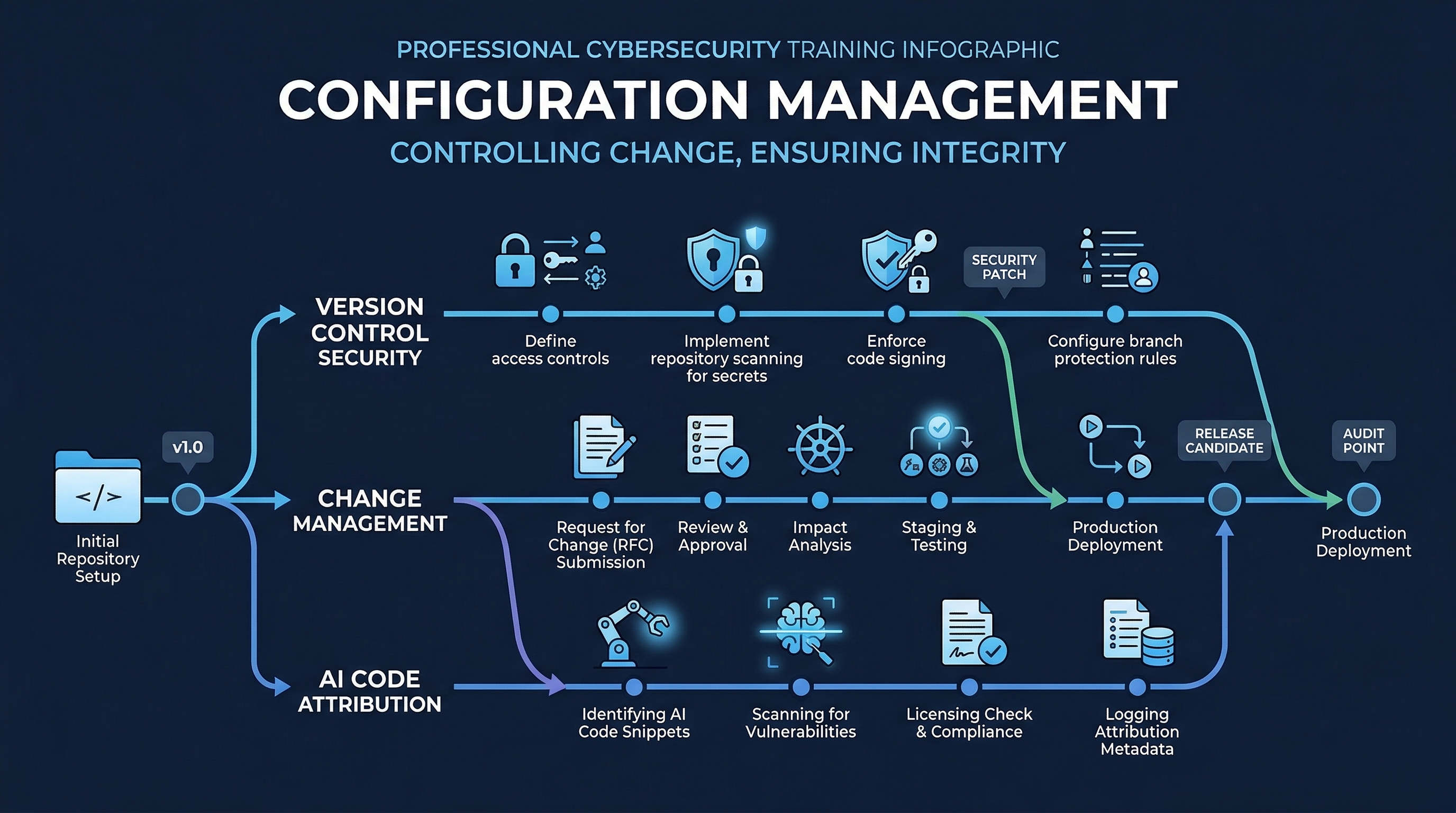 Figure: Configuration Management Overview — Track 4 coverage of version control, dependency management, and configuration security
1. Why Version Control Security Matters
Version control is not merely a convenience for collaboration. It is the authoritative record of every change made to a software system. In regulated industries and security-conscious organizations, the version control system (VCS) serves four critical functions that no other tool can replace.
1.1 Audit Trail
Every commit in a properly maintained repository represents a discrete, traceable change. Auditors — whether internal, external, or regulatory — rely on the VCS log to answer fundamental questions: Who changed this code? When? Why? Was the change authorized? Without a trustworthy audit trail, organizations cannot demonstrate compliance with frameworks like SOC 2 (Change Management criteria), PCI-DSS Requirement 6.5, or ISO 27001 Annex A.8.
A compromised or poorly maintained VCS audit trail is equivalent to a financial system with no general ledger. You cannot prove what happened.
1.2 Accountability
Commit signing and access controls tie every change to a verified identity. This is not about blame — it is about establishing a chain of custody for code that will run in production, handle customer data, and process financial transactions. Accountability deters unauthorized changes, enables incident investigation, and satisfies the principle of non-repudiation.
When a production incident occurs and the root cause is a code change, the investigation starts at the VCS. If that trail is ambiguous — unsigned commits, shared accounts, unclear attribution — the investigation stalls.
1.3 Change Tracking
Version control provides granular visibility into the evolution of the codebase. This supports impact analysis (what did this change affect?), dependency tracking (what changed alongside this?), and regression identification (when did this behavior first appear?). Effective change tracking requires disciplined commit practices: atomic commits, meaningful messages, and proper branch hygiene.
1.4 Rollback Capability
The ability to revert to a known-good state is a critical resilience mechanism. When a deployment introduces a vulnerability or breaks functionality, the VCS enables rapid rollback — but only if the history is clean, the branches are well-managed, and the deployment pipeline is wired to build from specific commits or tags.
Organizations that cannot roll back quickly are organizations that ship hotfixes under pressure, which is exactly when new vulnerabilities are introduced.
2. Branching Strategies in Depth
The choice of branching strategy has direct security implications. It determines how quickly security fixes reach production, how many parallel code paths need review, and how complex the merge process becomes (complexity being the enemy of security).
2.1 GitFlow
GitFlow, formalized by Vincent Driessen in 2010, uses a structured set of long-lived and short-lived branches.
Branch structure:
main— production-ready code, tagged with release versionsdevelop— integration branch for the next releasefeature/*— branched fromdevelop, merged back via PRrelease/*— branched fromdevelopwhen preparing a release, merged to bothmainanddevelophotfix/*— branched frommainfor urgent production fixes, merged to bothmainanddevelop
Best suited for:
- Products with versioned releases (desktop software, firmware, embedded systems)
- Regulated industries requiring formal release gates (healthcare, finance, government)
- Teams that need to support multiple production versions simultaneously
Security advantages:
- Clear separation between development and production code
- Release branches create natural gates for security review
- Hotfix branches enable emergency patching without destabilizing development
Security tradeoffs:
- Merge complexity increases with branch longevity; long-lived
developbranches can drift significantly frommain, making security fixes harder to propagate - More branches mean more targets for misconfiguration (a
release/*branch without protection rules is an attack surface) - Security fixes in
hotfix/*must be merged to bothmainanddevelop— if thedevelopmerge is forgotten, the fix is lost in the next release - Slower feedback loops: a vulnerability discovered in
developmay not reachmainfor weeks
2.2 Trunk-Based Development
Trunk-based development (TBD) uses a single shared branch (main or trunk) with very short-lived feature branches — typically less than one to two days, often just hours. All developers integrate to the trunk continuously.
Prerequisites (non-negotiable):
- Robust CI pipeline with fast automated testing (unit, integration, security scans)
- Feature flags for incomplete features (decouple deployment from release)
- High test coverage and confidence in the automated safety net
- Team discipline around small, incremental changes
Used at scale by: Google (monorepo with trunk-based development for 25,000+ engineers), Meta, Microsoft (Windows moved to trunk-based in 2017), Spotify.
Security advantages:
- Security fixes reach production within hours, not weeks
- No long-lived branches to accumulate unreviewed drift
- Continuous integration means security scans run on every change against the current state of production
- Merge conflicts are small and manageable, reducing the risk of error
- Feature flags provide a kill switch: if a deployed feature has a vulnerability, disable it without a code rollback
Security tradeoffs:
- Requires mature CI/CD and automated testing — without these, trunk-based development is reckless, not agile
- Feature flags add complexity and must be cleaned up (stale flags are technical debt and potential attack surface)
- Less natural separation for formal release gates (though release branches can still be cut from trunk)
2.3 GitHub Flow
GitHub Flow is a simplified model: one long-lived branch (main), with feature branches created from main and merged back via pull requests.
Characteristics:
- Feature branches are short-lived but not as aggressively short as pure TBD
- Pull requests are the primary review and gating mechanism
- Deployment happens from
mainafter merge - No separate
developorreleasebranches
Best suited for:
- Web applications with continuous delivery
- Teams adopting modern practices but not yet ready for pure TBD
- Projects where formal release branches are unnecessary
Security considerations:
- Simpler than GitFlow, which means fewer misconfiguration opportunities
- PR-based workflow provides a natural review gate
- Lacks the formal release branch structure that regulated industries may require
2.4 Recommendation
For organizations prioritizing security feedback speed, trunk-based development provides the fastest path from vulnerability discovery to production fix. The short branch lifetimes and continuous integration mean security scans are always running against near-production code.
For organizations operating under regulatory frameworks that mandate formal release gates, change approval records, and versioned release documentation, GitFlow provides the structural formalism to satisfy auditors — at the cost of velocity.
GitHub Flow is the pragmatic middle ground for teams that want PR-based review without the overhead of GitFlow’s multi-branch structure.
Regardless of strategy, the branching model must be documented, enforced through tooling (not just policy), and reviewed annually.
3. Commit Signing in Depth
Commit signing cryptographically binds a commit to a verified identity. Without signing, anyone with repository access can author commits as any name and email — Git does not authenticate user.name or user.email. This is not a theoretical concern: commit spoofing has been used in supply chain attacks.
3.1 GPG Signing
GPG (GNU Privacy Guard) signing is the most mature method with the richest feature set.
Setup:
# Generate a GPG key (use RSA 4096 or Ed25519)
gpg --full-generate-key

# List keys to find the key ID
gpg --list-secret-keys --keyid-format=long

# Configure Git to use the key
git config --global user.signingkey <KEY_ID>
git config --global commit.gpgsign true
git config --global tag.gpgsign true
Key features:
- Key revocation: if a private key is compromised, issue a revocation certificate and publish it to keyservers. Revoked keys invalidate all future signatures (past signatures remain valid as of the pre-revocation period)
- Key expiration: set expiration dates (recommended: 1-2 years) to force periodic key rotation
- Web of trust: keys can be signed by other keys, building a decentralized trust model
- Subkeys: use signing subkeys so the master key can remain offline
Verification:
git log --show-signature
git verify-commit <commit-hash>
Platform integration: GitHub, GitLab, and Bitbucket all display a “Verified” badge on GPG-signed commits. Upload your public key to the platform.
3.2 SSH Signing
Git 2.34 (released November 2021) introduced SSH key signing, which is significantly simpler to set up since most developers already have SSH keys.
Setup:
git config --global gpg.format ssh
git config --global user.signingkey ~/.ssh/id_ed25519.pub
git config --global commit.gpgsign true
Advantages:
- No separate GPG keyring to manage
- Reuse existing SSH authentication keys (or create dedicated signing keys — recommended for separation of concerns)
- Simpler key distribution (SSH public keys are already on platforms)
Limitations:
- No built-in revocation mechanism (rely on platform-level key removal)
- No key expiration in the SSH key format itself
- No web of trust model
- Allowed signers file must be maintained for local verification
Allowed signers for local verification:
# Create allowed signers file
git config --global gpg.ssh.allowedSignersFile ~/.ssh/allowed_signers

# Format: email key-type public-key
echo "developer@example.com ssh-ed25519 AAAA..." >> ~/.ssh/allowed_signers
3.3 S/MIME Signing
S/MIME (Secure/Multipurpose Internet Mail Extensions) uses X.509 certificates, typically issued by an enterprise PKI or public certificate authority.
Best suited for:
- Organizations with existing PKI infrastructure
- Environments where certificate-based identity is already the standard (government, defense, large enterprise)
Setup:
git config --global gpg.format x509
git config --global user.signingkey <certificate-fingerprint>
git config --global commit.gpgsign true
Advantages:
- Integrates with enterprise identity systems (Active Directory Certificate Services, etc.)
- Certificate revocation via CRL/OCSP
- Familiar to security teams already managing PKI
Limitations:
- Certificate management overhead
- Requires CA infrastructure
- Less commonly supported by Git hosting platforms
3.4 Gitsign (Sigstore)
Gitsign is part of the Sigstore project, providing keyless signing using OIDC (OpenID Connect) identity tokens. This is the emerging standard for open source and is gaining enterprise adoption.
How it works:
- Developer initiates a signed commit
- Gitsign redirects to an OIDC provider (GitHub, Google, Microsoft) for authentication
- Sigstore’s Fulcio CA issues a short-lived (10-minute) certificate bound to the OIDC identity
- The commit is signed with this ephemeral certificate
- The signature is recorded in Sigstore’s Rekor transparency log (immutable, publicly auditable)
Setup:
brew install sigstore/tap/gitsign   # macOS
git config --global commit.gpgsign true
git config --global gpg.x509.program gitsign
git config --global gpg.format x509
Advantages:
- No key management — keys are ephemeral
- Identity tied to organizational OIDC (prove you are who you say you are at time of signing)
- Transparency log provides tamper-evident record
- Ideal for open source and distributed teams
Limitations:
- Requires network access at signing time (OIDC flow)
- Relatively new; enterprise adoption still maturing
- Verification requires querying the Rekor transparency log
3.5 Enforcement
Signing is only useful if it is enforced. Voluntary signing creates a false sense of security — unsigned commits mixed with signed commits defeat the purpose.
Enforcement checklist:
- Enable “Require signed commits” on all protected branches (GitHub, GitLab, Bitbucket all support this)
- Reject unsigned commits at the merge gate — unsigned PRs cannot be merged
- CI pipeline check: verify signatures as a required status check
- Pre-receive hook (self-hosted Git): reject unsigned pushes at the server level
- Document accepted signing methods (GPG, SSH, Gitsign) and minimum key strength requirements
- Establish key rotation policy and revocation procedures
4. Branch Protection Rules
Branch protection rules are the technical enforcement layer for version control policy. A policy that says “all changes require review” without branch protection is a suggestion, not a control.
The following table presents the complete set of branch protection rules available on major platforms, with recommended settings for security-sensitive repositories.
| Protection Rule | Recommended Setting | Rationale |
|---|---|---|
| Require pull request reviews | Minimum 2 approvers | Reduces single-point-of-failure risk. Two reviewers catch what one misses. |
| Require status checks to pass | All CI checks required | No merge without passing tests, SAST, SCA, linting. Gate enforcement, not guidance. |
| Require signed commits | Enabled | Non-repudiation. Every merged commit tied to a verified identity. |
| Require linear history | Enabled (rebase or squash) | Clean, auditable history. No merge commits that obscure change sequence. |
| Restrict who can push | Limited to release automation / senior leads | Prevents direct pushes that bypass the PR process. |
| Require CODEOWNERS review | Enabled | Domain experts must approve changes to their areas. Security team owns security-critical paths. |
| Dismiss stale reviews on new pushes | Enabled | Prevents bait-and-switch: get approval, then push additional unreviewed changes. |
| Require conversation resolution | Enabled | Review comments must be addressed, not ignored. Forces engagement with feedback. |
| No force pushes | Enabled (no exceptions) | Force pushes destroy audit trail. A force-pushed branch cannot be trusted. |
| Include administrators | Enabled | Administrators are not above the process. No bypass, no exceptions, no “just this once.” |
| Require deployments to succeed | Enabled (if applicable) | Ensures staging deployment succeeds before merge to production branch. |
| Lock branch | When needed | During release freezes or incident response, lock the branch entirely. |
Implementation note: these rules must be applied programmatically using infrastructure-as-code (Terraform, Pulumi, GitHub Actions with gh api) rather than manual configuration. Manual configuration drifts. Automated configuration is auditable and reproducible.
5. Code Review Requirements
Code review is the single most effective human control in the development process. Static analysis catches patterns; code review catches intent, logic, and design flaws.
5.1 Pull Request Size
Research consistently shows that review quality degrades sharply as PR size increases. A study by SmartBear (based on Cisco Systems data) found that reviewers’ defect detection rate drops significantly after reviewing approximately 200-400 lines of code.
Guidelines:
- Target: 200-400 lines of changed code per PR
- Hard limit: 600 lines (anything larger should be split)
- Exception: generated code, migrations, and dependency lockfile updates (flag these for expedited review)
- Measure and track PR size as a team metric
Large PRs are not just a review quality problem — they are a security problem. A 2,000-line PR hides vulnerabilities in volume. A 200-line PR has nowhere to hide.
5.2 CODEOWNERS
The CODEOWNERS file assigns review responsibility to individuals or teams based on file paths. This ensures domain experts review changes to their areas.
# .github/CODEOWNERS

# Security-critical paths require security team review
/src/auth/              @security-team
/src/crypto/            @security-team
/infrastructure/        @security-team @platform-team
*.tf                    @platform-team
Dockerfile*             @platform-team @security-team

# API contracts require API team review
/api/                   @api-team
openapi.yaml            @api-team

# Database changes require DBA review
/migrations/            @dba-team
/src/models/            @backend-team @dba-team
Security-critical CODEOWNERS patterns:
- Authentication and authorization code
- Cryptographic implementations
- Infrastructure-as-code (Terraform, CloudFormation, Kubernetes manifests)
- CI/CD pipeline definitions
- Dependency manifests (
package.json,requirements.txt,go.mod) - Dockerfiles and container configurations
- Security policy files (CSP headers, CORS configuration)
- Secret management code
5.3 Security-Focused Review Checklist
Every code review should include a security lens. The following checklist should be integrated into the PR template:
- No hardcoded secrets, API keys, passwords, or tokens
- Input validation on all external inputs (user input, API parameters, file uploads)
- Output encoding applied where data is rendered (HTML, SQL, LDAP, OS commands)
- Authentication and authorization checks are present and correct
- Error handling does not leak sensitive information (stack traces, internal paths, database details)
- Logging includes security-relevant events without logging sensitive data (passwords, tokens, PII)
- Dependencies added/updated have been checked for known vulnerabilities
- New API endpoints have appropriate rate limiting and authentication
- Database queries use parameterized statements (no string concatenation)
- File operations validate paths (no path traversal)
- Cryptographic operations use approved algorithms and libraries (no custom crypto)
- Data classification: does this change handle, store, or transmit PII/PCI/PHI data?
5.4 Automated Pre-Review Gates
Before a human reviewer sees the PR, automated checks should have already run:
- Linting and formatting — reject PRs that fail style checks (stop wasting human review time on formatting)
- SAST scan — static analysis results annotated directly on the PR
- SCA scan — dependency vulnerability and license check
- Secret detection — tools like TruffleHog, GitLeaks, or detect-secrets running on the diff
- Unit tests — all passing
- Code coverage — meets minimum threshold (no coverage regression)
- Build success — the artifact builds cleanly
If any automated gate fails, the PR is not ready for human review. This preserves reviewer bandwidth for the work that requires human judgment.
5.5 Review SLA
Review latency is a security concern. A security patch sitting in review for three days is a security patch not in production for three days.
Recommended SLAs:
- Standard PR: initial review within 24 hours
- Security patch (labeled
security): initial review within 4 hours - Critical vulnerability fix: immediate review, pull reviewer from current work if necessary
- Dependency update (automated, e.g., Dependabot/Renovate): within 48 hours
Track review latency as a metric. If the median time-to-first-review exceeds 24 hours, the team has a process problem.
6. Merge Policies
How code enters the main branch affects the quality of the audit trail.
6.1 Squash Merge for Feature Branches
When merging a feature branch, squash all commits into a single commit on main. This produces a clean, linear history where each commit represents one complete, reviewed change.
Why: Feature branch history often contains work-in-progress commits (“WIP”, “fix typo”, “actually fix it this time”) that pollute the main branch history and make auditing harder. Squash merge preserves the PR as the detailed record while keeping main clean.
# GitHub: set as default merge method in repository settings
# CLI equivalent:
git merge --squash feature/add-auth
git commit -m "feat: implement OAuth2 authentication (#142)"
6.2 Merge Commit for Release Branches
When merging a release branch to main, use a standard merge commit to preserve the complete history of changes included in the release. This is important for release auditing — the merge commit is a clear marker of what shipped in which release.
6.3 No Direct Commits to Protected Branches
All changes to main, develop, and release/* branches must go through a pull request. No exceptions. This is enforced by branch protection rules (Section 4), not just policy.
If an emergency requires a direct commit (infrastructure is on fire, the PR process is literally unavailable), treat it as an incident: document it, review it post-hoc within 24 hours, and file a process exception report.
6.4 Delete Branch on Merge
Configure the repository to automatically delete feature branches after merge. Stale branches are clutter at best and a security concern at worst — an attacker with access to a stale branch could push code that appears to be from a legitimate (if old) development effort.
7. AI and Version Control
The widespread adoption of AI code generation tools (GitHub Copilot, Claude Code, Amazon CodeWhisperer, Cursor, Cody, and others) introduces challenges to version control that existing processes were not designed to handle.
7.1 Code Provenance Challenges
When a developer writes code, the provenance is clear: the developer authored it, and the developer (and their employer, per work-for-hire agreements) holds the relevant rights. When an AI tool generates code, provenance becomes murky.
There is currently no reliable mechanism to determine whether AI-generated code infringes on the intellectual property rights of the training data. AI models are trained on billions of lines of code under various licenses (MIT, Apache, GPL, proprietary). The output is a probabilistic synthesis — not a copy, not a clean-room implementation, but something in between for which intellectual property law has no settled category.
This provenance gap means organizations cannot assert with confidence that AI-generated code is free of licensing obligations. Module 4.3 covers the legal landscape in detail. From a version control perspective, the implication is: AI-generated code must be identifiable in the repository.
7.2 Tagging AI-Generated Commits
Organizations should establish a standard for marking AI-generated or AI-assisted code in version control metadata. There is no industry standard yet, but the following practices are emerging:
Commit message conventions:
feat: implement rate limiting for API endpoints

AI-Assisted: yes
AI-Tool: Claude Code (claude-opus-4-20250514)
AI-Contribution: initial implementation generated, human-reviewed and modified
Git trailer format:
git commit -m "feat: implement rate limiting" \
  --trailer "AI-Assisted=yes" \
  --trailer "AI-Tool=GitHub Copilot" \
  --trailer "AI-Review=security-reviewed"
PR labels: Apply labels like ai-generated, ai-assisted, or copilot to pull requests that contain AI-generated code. This enables filtering and reporting.
Benefits of tagging:
- Enables targeted auditing of AI-generated code
- Supports license compliance workflows (Section 7.1)
- Provides data for organizational metrics (what percentage of code is AI-generated?)
- Facilitates enhanced review processes for AI-generated changes
- Creates an audit trail for regulatory inquiries about AI use in software development
7.3 AI-Generated Code Review Workflow
AI-generated code should receive enhanced scrutiny during code review, not less. The fact that an AI produced the code does not mean it is correct, secure, or appropriate.
Enhanced review process for AI-tagged changes:
- Automated gates: AI-tagged PRs trigger additional scans (license compliance, deeper SAST, code similarity analysis)
- Reviewer awareness: PR template includes a section declaring AI tool usage and the nature of AI contribution
- Security review: AI-generated code that touches authentication, authorization, cryptography, or data handling requires mandatory security team review
- License scan: SCA tools scan AI-generated code specifically for potential license contamination (see Module 4.3)
- Logic review: AI-generated code is particularly prone to “looks right but is subtly wrong” patterns — reviewers should test edge cases and boundary conditions more rigorously
7.4 Git Metadata for AI Attribution Tracking
Beyond commit-level tagging, organizations can use Git notes, custom refs, or external metadata stores to track AI attribution:
# Git notes for AI attribution (does not modify commit history)
git notes add -m '{"ai_tool": "Claude Code", "ai_model": "opus", "human_review": true, "review_depth": "security"}' <commit-hash>

# Query AI-attributed commits
git log --notes --grep="ai_tool" --oneline
For organizations requiring more structured tracking, integrate AI attribution data into the CI/CD pipeline metadata store (e.g., as build artifacts, pipeline variables, or entries in a dedicated attribution database).
8. NIST SSDF Alignment
NIST SSDF PS.1: Protect All Forms of Code from Unauthorized Access and Tampering
The practices in this module directly implement NIST SSDF PS.1:
| SSDF PS.1 Requirement | Implementation in This Module |
|---|---|
| Protect code from unauthorized access | Branch protection rules, access controls, restricted push permissions |
| Protect code from tampering | Commit signing, no force pushes, signed commits required on protected branches |
| Verify integrity of code | Signature verification, required status checks, CI pipeline validation |
| Provide audit trail for code changes | Commit history, PR review records, merge policies, AI attribution tracking |
| Protect supporting tools and infrastructure | VCS platform security, SSO integration, access reviews, audit logging |
Organizations preparing for NIST SSDF compliance should use this module as the implementation guide for PS.1 controls within their version control systems.
9. Key Takeaways
- Version control security is not optional infrastructure — it is a foundational security control that enables audit, accountability, change tracking, and rollback.
- Choose a branching strategy that matches your regulatory and operational context: trunk-based for velocity, GitFlow for formal release gates, GitHub Flow for pragmatic balance.
- Enforce commit signing — voluntary signing is theater. Pick a method (GPG for maturity, SSH for simplicity, Gitsign for keyless), and make it mandatory.
- Branch protection rules are the enforcement mechanism. Configure them programmatically, apply them without exceptions, and include administrators.
- Code review is a security control. Keep PRs small, enforce CODEOWNERS, automate the automatable, and hold to review SLAs.
- Merge policies shape audit trail quality. Squash for features, merge commits for releases, never allow direct commits to protected branches.
- AI-generated code must be tagged, tracked, and subjected to enhanced review. The provenance gap is real and legally unresolved.
Review Questions
-
Your organization uses GitFlow and discovers a critical vulnerability in production. Trace the path of a hotfix from discovery to deployment. Which branches are involved, and what are the merge requirements?
-
A developer argues that requiring commit signing adds unnecessary friction. Construct the case for mandatory signing, addressing their concern about developer experience.
-
You discover that an administrator has been pushing directly to
mainto “save time” on urgent fixes, bypassing branch protection. What organizational and technical controls would you implement to prevent this? -
Your team is adopting AI code generation tools. Design a policy for AI attribution in version control that balances developer productivity with auditability and license compliance.
-
A regulatory auditor asks you to demonstrate that no unauthorized changes have been made to production code in the last 12 months. What evidence from your VCS would you present?
Module 4.1 of the SSDLC + CIS Controls v8 CG16 + AI-Augmented Development Training Program Track 4: Version Control & Change Management (Dev + DevOps)
Study Guide
Key Takeaways
- VCS serves four critical security functions — Audit trail, accountability, change tracking, and rollback capability; none replaceable by other tools.
- Branching strategy has direct security implications — Trunk-based development gets fixes to production in hours; GitFlow provides formal release gates for regulated industries.
- Commit signing must be enforced, not voluntary — Unsigned commits mixed with signed commits defeat the purpose; four methods: GPG, SSH, S/MIME, Gitsign (Sigstore).
- Branch protection rules are the enforcement layer — Minimum 2 approvers, require signed commits, require status checks, dismiss stale reviews, include administrators.
- PR size of 200-400 lines maximizes defect detection — Beyond 600 lines, reviewer fatigue causes security vulnerabilities to be missed.
- AI-generated code must be tagged in VCS — Git trailers (AI-Assisted, AI-Tool, AI-Review) enable targeted auditing, license compliance, and metrics.
- NIST SSDF PS.1 is directly implemented — Protecting code from unauthorized access and tampering through branch protection, signing, and audit trails.
Important Definitions
| Term | Definition |
|---|---|
| Trunk-Based Development | Single shared branch with very short-lived feature branches (hours to 1-2 days) |
| GitFlow | Structured branching with main, develop, feature/, release/, and hotfix/* branches |
| Gitsign (Sigstore) | Keyless commit signing using ephemeral OIDC certificates with transparency log |
| CODEOWNERS | File assigning required reviewers based on file paths; security team owns security-critical paths |
| Branch Protection | Technical enforcement of review requirements, signed commits, status checks, and merge restrictions |
| Squash Merge | Combining all feature branch commits into a single commit on main for clean audit history |
| Git Trailer | Machine-parseable metadata in commit messages (e.g., AI-Assisted=yes, AI-Tool=Claude Code) |
| NIST SSDF PS.1 | Protect All Forms of Code from Unauthorized Access and Tampering |
Quick Reference
- Framework/Process: Three branching strategies (GitFlow, Trunk-Based, GitHub Flow); four signing methods (GPG, SSH, S/MIME, Gitsign); NIST SSDF PS.1 implementation
- Key Numbers: 200-400 lines optimal PR size; 600 line hard limit; minimum 2 approvers; 24-hour review SLA (standard); 4-hour review SLA (security patches); Git 2.34 introduced SSH signing
- Common Pitfalls: Allowing administrators to bypass branch protection; forgetting to merge GitFlow hotfixes back to develop; force pushing (destroys audit trail); not dismissing stale reviews on new pushes (enables bait-and-switch)
Review Questions
- What is the primary security advantage of trunk-based development over GitFlow, and when would you choose GitFlow despite this?
- How does Gitsign (Sigstore) differ from traditional GPG signing, and what trade-offs does keyless signing introduce?
- Why should “dismiss stale reviews on new pushes” be enabled in branch protection?
- How would you design an AI attribution policy for version control that balances developer productivity with auditability?
- What evidence from your VCS would you present to a regulatory auditor asking about unauthorized changes to production code?