1.5 — AI Governance for Development
Listen instead
Learning Objectives
- ✓ Design and charter an AI Governance Board with appropriate composition and decision authority
- ✓ Draft an Acceptable Use Policy for AI coding assistants covering all required domains
- ✓ Implement the three-tier tool classification model with enforcement mechanisms
- ✓ Quantify and address the shadow AI problem using detection and mitigation strategies
- ✓ Configure secure integration patterns for major AI coding assistants
- ✓ Reference industry AI policies from Google, Microsoft, Meta, Samsung, and Apple
- ✓ Apply the OpenSSF security-focused guide for AI-assisted development
- ✓ Implement repository-level AI security policies through AGENTS.md and custom instruction files
- ✓ Execute the CSA five-step AI governance model
- ✓ Define and measure AI governance KPIs
1. AI Governance Board
Why a Dedicated AI Governance Body
AI coding tools are not just another software category. They process organizational code, generate production software, access development environments, and create intellectual property. The decisions about which AI tools to use, how they are configured, what data they can access, and how their output is validated have implications across security, legal, engineering, compliance, and risk management. No single team has the expertise to make these decisions alone.
Composition
An effective AI Governance Board requires representation from five functions:
Security (CISO or delegate):
- Evaluates AI tools against security requirements
- Defines data handling and access control requirements
- Assesses threat vectors introduced by AI tools
- Reviews AI-related security incidents
- Owns AI tool security configuration standards
Legal (General Counsel or delegate):
- Evaluates IP implications of AI-generated code
- Reviews AI tool terms of service and data processing agreements
- Assesses regulatory compliance implications (EU AI Act, HIPAA, PCI)
- Advises on liability for AI-generated defects
- Reviews indemnification and IP provisions in AI tool contracts
Engineering (VP Engineering or delegate):
- Represents developer needs and productivity considerations
- Evaluates AI tool quality and effectiveness
- Defines integration patterns and development workflow impact
- Manages AI tool deployment and configuration
- Provides feedback on AI tool accuracy and usefulness
Compliance (Chief Compliance Officer or delegate):
- Maps AI tool usage to regulatory requirements
- Ensures training programs meet compliance mandates
- Validates evidence collection for AI-related compliance controls
- Monitors changes in regulatory landscape affecting AI usage
- Owns compliance reporting for AI governance
Risk Management (CRO or delegate):
- Assesses organizational risk appetite for AI adoption
- Evaluates risk-reward tradeoff of AI tool adoption
- Monitors risk metrics related to AI usage
- Escalates risk threshold breaches
- Integrates AI risk into enterprise risk management framework
Decision Framework
The AI Governance Board must have a structured decision-making process:
Tool Evaluation Process:
- Engineering submits AI tool request with use case justification
- Security conducts technical security assessment (data handling, access controls, authentication, audit logging)
- Legal reviews terms of service, DPA, IP provisions, indemnification
- Compliance maps usage to applicable regulatory requirements
- Risk assesses residual risk after controls
- Board votes: Approve (Tier 1 or 2), Defer (pending conditions), or Reject (Tier 3)
Decision criteria:
- Data handling: Does the tool process, store, or train on organizational data?
- Access controls: Does the tool support SSO, RBAC, and audit logging?
- Compliance: Does the tool have relevant certifications (SOC 2, ISO 27001, ISO 42001)?
- Contractual: Are DPA, BAA (if needed), IP indemnification in place?
- Security: Has the tool undergone security assessment? Pen test results available?
- Risk: What is the residual risk with proposed controls?
Review cadence: Quarterly for existing tool re-evaluation. Ad hoc for new tool requests. Annual for comprehensive program review.
Escalation and Exception Process
Not every AI use case fits neatly into policy. The Board must have:
- Expedited review path for urgent tool requests (48-hour turnaround)
- Exception process with risk acceptance documentation and expiration date
- Appeal mechanism for rejected tool requests
- Emergency revocation authority for compromised or non-compliant tools
2. Acceptable Use Policies for AI Coding Assistants
Policy Domains
A comprehensive Acceptable Use Policy (AUP) for AI coding assistants must address nine domains:
Domain 1: Approved Tool Catalog
Maintain a current list of approved AI tools with their tier classification, approved use cases, and configuration requirements. This catalog must be:
- Accessible to all developers (wiki, intranet, Confluence, or equivalent)
- Updated within 48 hours of any Board decision
- Versioned with change history
- Searchable by use case, language, and platform
Catalog format per tool:
- Tool name and version/tier
- Approved use cases (code generation, code review, documentation, testing, debugging)
- Prohibited use cases (if tier 2)
- Required configuration settings
- Maximum data classification allowed
- Training prerequisites
- License/access request process
- Technical support contact
Domain 2: Data Classification Rules
Define what data can be shared with each tool tier:
| Data Classification | Tier 1 (Fully Approved) | Tier 2 (Limited Use) | Tier 3 (Prohibited) |
|---|---|---|---|
| Public | Permitted | Permitted | Not permitted for work |
| Internal | Permitted | Permitted with restrictions | Not permitted for work |
| Confidential | Permitted with controls | Not permitted | Not permitted for work |
| Restricted (PII, PHI, CHD, secrets) | Not permitted | Not permitted | Not permitted for work |
Absolute prohibitions regardless of tool tier:
- Production credentials, API keys, secrets, tokens
- Customer data (PII, PHI, financial data)
- Encryption keys, certificates, private keys
- Security vulnerability details before public disclosure
- Passwords, connection strings with credentials
- Access tokens, session tokens, OAuth tokens
Domain 3: Code Review Requirements
All AI-generated or AI-assisted code must undergo human review with additional scrutiny:
Minimum review criteria for AI-generated code:
- Reviewer must understand the code (not just approve AI output blindly)
- Security-relevant code (authentication, authorization, cryptography, input validation) requires security-qualified reviewer
- Dependencies introduced by AI must be verified to exist and be appropriate
- AI-generated code must pass all existing quality gates (SAST, unit tests, integration tests)
- Reviewer must verify the code actually solves the intended problem (not just appears to)
- Comments or annotations indicating AI assistance must be preserved per organizational policy
Enhanced review for AI-generated code:
- Check for hallucinated APIs, methods, or language features
- Verify error handling is complete (AI often generates optimistic-path-only code)
- Check for hardcoded values that should be configurable
- Verify input validation is present and correct
- Check for proper resource cleanup (connections, file handles, memory)
- Verify thread safety if applicable
Domain 4: Intellectual Property and License Compliance
- AI-generated code must comply with the organization’s open-source license policy
- Code suggestions that closely match existing copyrighted code must be rejected
- Tools with IP indemnification provisions are preferred (Tier 1 criterion)
- Developers must not claim sole authorship of substantially AI-generated code for IP or patent purposes without legal guidance
- License scanning must be applied to AI-suggested dependencies
- AI tool terms of service regarding output ownership must be reviewed by legal
Domain 5: Secret Handling
- Pre-commit hooks must scan for secrets before any code reaches version control
- AI tool configurations must include deny patterns for sensitive file types:
.env,.key,.pem,.p12,.pfx,.jks,.keystore,.credentials,.secret,.token - IDE plugins for AI tools must be configured to exclude sensitive directories from context
- Developers must verify that code snippets shared with AI tools do not contain embedded credentials
- AI tools must not be granted access to secret management systems (Vault, AWS Secrets Manager, etc.)
Domain 6: DLP Controls
Data Loss Prevention controls for AI tool usage:
- Endpoint DLP monitoring clipboard operations to AI tool interfaces
- Network DLP monitoring API calls to AI service endpoints
- Browser DLP for web-based AI tools
- API proxy for AI tool API calls to inspect and filter sensitive content
- Content inspection rules specifically tuned for code-embedded secrets, PII patterns, and proprietary indicators
Domain 7: Incident Reporting
Define incidents that must be reported and the reporting process:
Reportable incidents:
- Accidental sharing of restricted data with any AI tool
- AI tool generating code that contains or references internal secrets
- Discovery of unauthorized AI tool usage (shadow AI)
- AI tool behaving unexpectedly (generating malicious code, exfiltrating data)
- AI tool experiencing a security breach (vendor notification)
- AI-generated code causing a security vulnerability in production
Reporting process:
- Immediate notification to security team (same channel as security incidents)
- Incident classification and triage
- Containment actions (revoke AI tool access, rotate exposed credentials)
- Investigation and root cause analysis
- Remediation and process improvement
- Lessons learned documented and shared
Domain 8: Training Prerequisites
Before using any approved AI tool, developers must complete:
- AI tool security awareness training (Module 1.5 of this program)
- Tool-specific configuration and usage training
- Data classification awareness training (or refresher)
- Acceptable Use Policy acknowledgment (signed)
- Hands-on demonstration of secure tool usage (for Tier 1 tools)
Training must be refreshed annually and whenever significant policy changes occur.
Domain 9: Audit and Compliance
- AI tool usage must be logged (tool access logs, query volumes, data classification of inputs)
- Periodic audits of AI tool configuration compliance
- Random sampling of AI-generated code for quality and security review
- Annual policy compliance assessment
- Audit findings reported to AI Governance Board
3. Three-Tier Tool Classification — Detailed Implementation
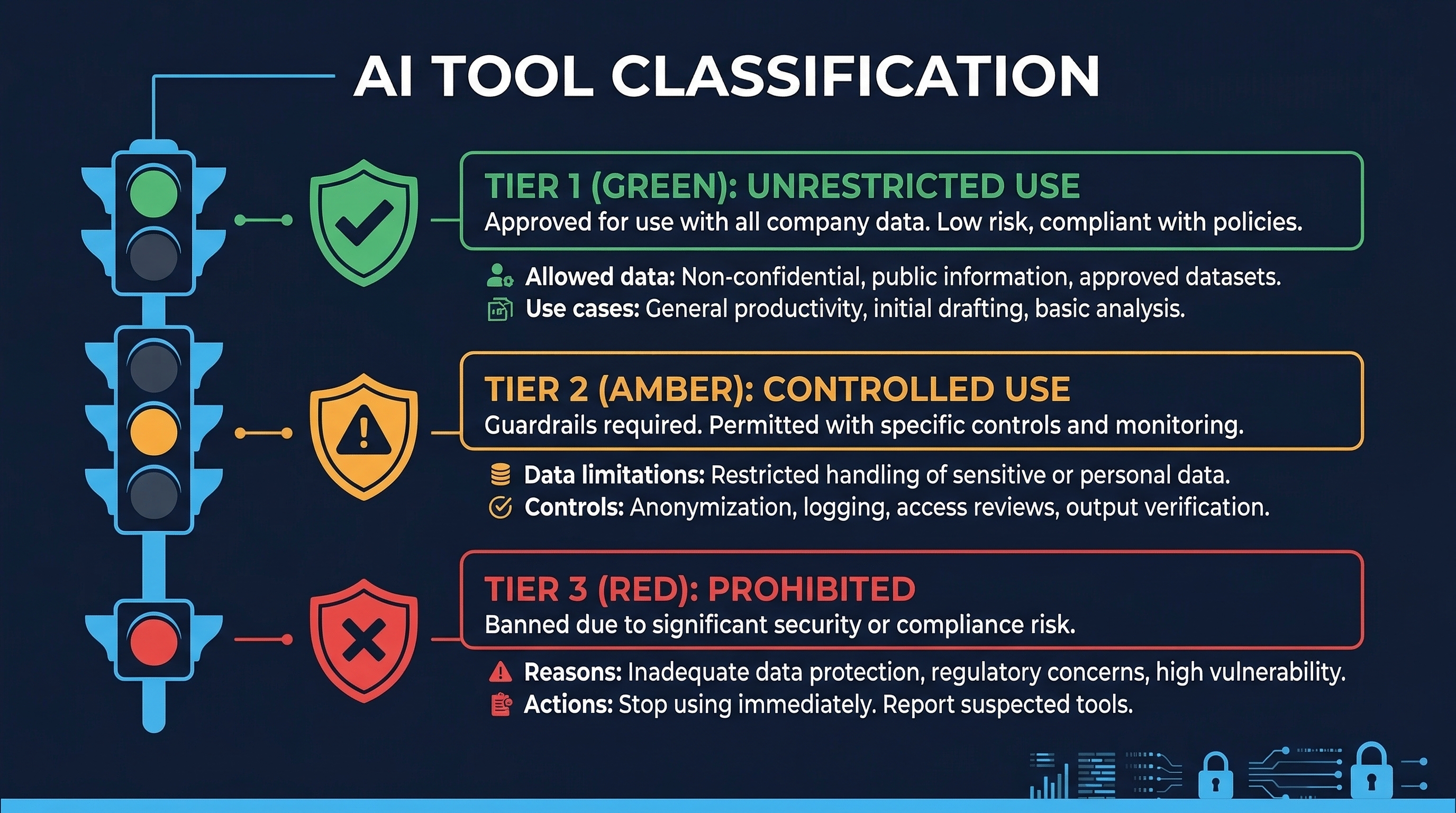 Figure: AI Three-Tier Classification — Tier 1 (Fully Approved), Tier 2 (Limited Use), and Tier 3 (Prohibited) decision criteria
Tier 1: Fully Approved — Enterprise Grade
Security Requirements:
- SSO/SAML integration (no standalone passwords)
- SCIM provisioning for automated user lifecycle management
- Zero data retention or organization-controlled retention policies
- Audit logging accessible to the organization’s SIEM
- Content exclusion / context filtering capabilities
- Role-Based Access Control within the tool
- SOC 2 Type II and/or ISO 27001 certification
- Data Processing Agreement (DPA) executed
- IP indemnification clause in contract
- Incident notification SLA in contract (24-hour notification for security incidents)
- Annual penetration test results available for review
- Data residency options aligned with organizational requirements
Configuration Standards:
- SSO enforced, local authentication disabled
- Data retention set to minimum required (prefer zero retention)
- Content exclusions configured for:
.env,.key,.pem, secrets directories, vendor directories with proprietary code, generated credential files - Telemetry configured per organizational privacy requirements
- Audit logging enabled and integrated with SIEM
- Model selection restricted to approved models (if applicable)
- Organizational policies / AGENTS.md configured in all repositories
Approved for: All development activities with non-restricted data. Production code generation. Security-relevant code (with enhanced review). All project types.
Tier 2: Limited Use — Controlled Access
Security Requirements:
- Team or professional license (some access controls)
- Written commitment to not train on user data (contractual or ToS)
- Some audit capability (at minimum, usage tracking)
- Basic access controls (team management)
- Privacy policy reviewed and acceptable
Configuration Standards:
- Team admin controls enabled
- Usage restricted to designated projects only
- Context limited to non-sensitive code
- Regular review of usage patterns
Approved for: Non-sensitive projects only. Prototyping and learning. Public or internal data classification only. Must NOT be used with: proprietary algorithms, customer data, security-sensitive code, regulated data (PCI, HIPAA, GDPR scope), production secrets.
Tier 3: Prohibited — No Work Use
Characteristics that result in Tier 3 classification:
- Free tier or consumer accounts
- Terms of service permit training on user inputs
- No organizational access controls
- No audit logging
- No DPA available
- Unable to configure content exclusions
- No incident notification commitment
- No security certifications
Not approved for: Any work-related use. This includes: code generation, code review, debugging, documentation, testing, brainstorming, or any other development activity using work data.
Clarity on personal use: Personal use of Tier 3 tools on personal devices with no work data is outside organizational scope. However, developers must understand that any work context (even conceptual descriptions of work projects) shared with Tier 3 tools may constitute a policy violation.
4. Shadow AI — Scale, Risk, and Mitigation
The Scale of the Problem
The statistics on unauthorized AI usage in organizations are alarming:
- 98% of organizations report some level of unsanctioned AI tool use
- 68% of employees across all functions admit to using unauthorized AI tools for work tasks
- 79% of engineering teams have at least one member using unapproved AI coding tools
- 45% of developers specifically admit to using AI coding assistants without organizational approval
- Only 37% of organizations have formal AI governance policies in place
- When approved tools with clear policies are provided, unauthorized AI usage drops by 89%
Security Implications
Shadow AI in development creates five categories of risk:
Data Leakage: Every prompt to an unauthorized AI tool is a potential data leak. Developers routinely paste code snippets, error messages, database schemas, API designs, and architecture descriptions into AI tools. This content may contain business logic, vulnerability details, infrastructure information, and occasionally credentials or PII.
Expanded Attack Surface: Each unauthorized AI tool is an additional third-party service with access to organizational code and development context. These tools have their own vulnerabilities, their own supply chains, and their own incident histories — none of which the organization can monitor or respond to.
Compliance Violations: Unauthorized AI tools may process data in ways that violate PCI-DSS (cardholder data), HIPAA (protected health information), GDPR (personal data), or industry-specific regulations. The organization may not even know the violation occurred until an audit or breach.
IP Contamination: AI tools may expose developers to code generated from training data with incompatible licenses. Code generated by unauthorized tools may include fragments that create license compliance issues, particularly problematic for organizations with commercial software products.
Quality and Security Risks: Code generated by ungoverned AI tools is not subject to organizational quality controls. There is no configuration of content exclusions, no organizational coding standard enforcement, and no tracking of AI-generated code for enhanced review.
Detection Methods
SaaS Discovery Platforms
Cloud Access Security Brokers (CASBs) and SaaS discovery platforms can identify AI service usage through:
- SSO authentication logs (login events to AI services)
- DNS query analysis (queries to known AI service domains)
- Browser telemetry from managed endpoints
- Network flow analysis (connections to AI API endpoints)
Browser Extension Auditing
Many AI tools operate as browser extensions. Endpoint management platforms can:
- Inventory all installed browser extensions
- Identify AI-related extensions by name, publisher, or permissions
- Block installation of unapproved extensions
- Alert on new AI extension installations
Endpoint DLP
Endpoint DLP solutions can monitor:
- Clipboard operations (copy/paste to AI tool interfaces)
- Browser form submissions to known AI service URLs
- File uploads to AI services
- API calls from local AI tool installations
API Call Pattern Analysis
Network monitoring at the perimeter or proxy level can detect:
- API calls to known AI service endpoints (api.openai.com, api.anthropic.com, api.github.com/copilot)
- Unusual data volumes to AI service IP ranges
- HTTPS connections to newly categorized AI services
CASB Solutions
Cloud Access Security Brokers provide the most comprehensive shadow AI detection:
- Inline CASB (proxy mode): Inspects all web traffic in real-time, can block unauthorized AI services
- API CASB: Integrates with SaaS platforms to discover connected AI services
- Log-based CASB: Analyzes firewall, proxy, and DNS logs for AI service indicators
Commercial Solutions for Shadow AI Detection
Several commercial platforms specifically address shadow AI discovery:
- Palo Alto Networks AITM (AI Access Security): AI-specific discovery and control through SASE platform
- Zscaler AI/ML App Segmentation: Discovery and policy enforcement for AI applications through zero trust exchange
- Nightfall AI: DLP platform specifically designed to detect sensitive data flowing to AI services
- Harmonic Security: Purpose-built shadow AI discovery and governance platform
- Prompt Security: AI security platform with shadow AI detection and prompt inspection capabilities
Mitigation Strategy
The evidence is clear: prohibition fails, enablement succeeds.
- Provide approved tools: Deploy Tier 1 tools that meet developer needs. If developers are using unauthorized AI tools, it is because the approved alternatives are insufficient or nonexistent.
- Make access easy: SSO-integrated tools that work in existing development workflows. No separate logins, no manual configuration, no friction.
- Communicate the why: Developers are more likely to comply with policies they understand. Explain that data protection is the concern, not productivity restriction. Share real-world examples of data leaks through AI tools.
- Monitor proportionately: Use technical controls to detect shadow AI, but respond proportionately. First violations should trigger education, not punishment (unless the violation involves restricted data).
- Iterate based on feedback: Regularly survey developers about their AI tool needs. If shadow AI persists, it indicates unmet needs — address the need, and the shadow usage will follow.
- Executive sponsorship: AI governance policies without executive backing will be ignored. The CISO and CTO must jointly champion the program.
5. Secure AI Integration Patterns
Permission Controls Per Tool
Each major AI coding assistant has specific security configuration options:
Claude Code (Anthropic)
Three-tier permission model:
- Allow: Tool executes without confirmation
- Ask: Tool requires user confirmation before execution
- Deny: Tool is blocked from execution
Configuration through:
.claude/settings.jsonat project and user levelsCLAUDE.md/AGENTS.mdfiles for repository-level policies- Deny patterns for file access (e.g., deny read/write to
.env,.key,.pem,secrets/) - Network access controls (allow-list specific domains)
- Command execution restrictions (deny destructive commands)
GitHub Copilot (Enterprise)
Content exclusion configuration:
- Repository-level content exclusions (exclude specific files/directories from context)
- Organization-level exclusion patterns
- IP indemnification (Enterprise tier only)
- Audit logging through GitHub API
- SAML SSO enforcement
- Copilot policy at organization level (enable/disable per team)
Cursor (Privacy Mode)
Privacy mode configuration:
- Privacy mode: code is not stored or used for training
- SOC 2 Type II certification (Business plan)
- Directory-level ignore patterns (
.cursorignore) - Model selection restrictions
- Context window management
OpenAI Codex (Sandboxed)
Sandboxing architecture:
- Code execution in isolated cloud sandboxes
- Network-restricted by default (configurable)
- File system access limited to workspace
- No persistent state between sessions
- Audit logging of all actions
Roo Code (VS Code Extension)
Permission configuration:
- Custom modes with per-tool permission settings
- File access patterns (read/write allow/deny lists)
- Command execution restrictions
- API access controls
- MCP server permission management
Credential Protection Patterns
All AI tool configurations should include deny patterns for sensitive files:
# Files to exclude from AI context
.env
.env.*
*.key
*.pem
*.p12
*.pfx
*.jks
*.keystore
*.credentials
*.secret
*.token
id_rsa
id_ed25519
*.crt (private certs)
secrets/
credentials/
.aws/
.gcp/
.azure/
vault-config.*
Data Retention Policies by Tool
| Tool | Default Retention | Enterprise Option | Training Data Usage |
|---|---|---|---|
| GitHub Copilot Enterprise | Transient (real-time only) | Audit logs retained per org policy | Not used for training (Enterprise) |
| Claude Enterprise | Per conversation | Zero retention option | Not used for training (Enterprise) |
| Cursor Business | Per session | Privacy mode (no retention) | Not used for training (Privacy mode) |
| OpenAI Codex | Task duration | Sandboxed, ephemeral | Not used for training (API/Business) |
API Key Management
- AI tool API keys must be managed through the organization’s secret management system
- Keys must be rotated on a defined schedule (90 days recommended)
- Keys must have minimum necessary permissions (scoped to specific projects/teams)
- Key usage must be monitored for anomalies
- Compromised keys must be revoked immediately (included in incident response playbook)
Audit Logging
All AI tool interactions should be logged:
- User identity (who used the tool)
- Timestamp (when)
- Action type (code generation, code review, documentation, etc.)
- Input context summary (not full content — privacy/data classification considerations)
- Output summary
- Model used
- Project/repository context
Logs must be:
- Centralized (SIEM integration)
- Retained per compliance requirements
- Monitored for anomalies (unusual volume, unusual hours, unusual data patterns)
- Available for audit and investigation
6. Industry AI Policies
- Reports 30%+ of new code is AI-generated as of 2024
- Uses primarily internal tools (Gemini Code Assist, internal models)
- Maintains that “AI-generated code must meet the same quality bar” as human-written code
- Requires human review and testing of all AI-generated code
- Code ownership and responsibility remains with the human developer
- Rigorous internal governance through existing code review culture
Microsoft
- Reports 20-30% of code is AI-assisted
- Uses GitHub Copilot extensively (own product)
- Published an Enterprise Code of Conduct for AI-assisted development
- Requires that developers understand and can explain AI-generated code
- Mandates security review for AI-generated code in security-sensitive components
- Provides IP indemnification for Copilot Enterprise customers
Meta
- Growing AI adoption in development workflows
- Requires developers to “demonstrate understanding” of AI-generated code
- Developers must be able to explain what the code does, why it was written this way, and what security implications exist
- Maintains internal AI coding tools with organizational controls
- Active research in AI code security and safety
Samsung
- Banned AI coding tools after a data leak incident in 2023
- Engineers inadvertently shared proprietary semiconductor design data with ChatGPT
- Led to complete prohibition of external AI tools for work
- Subsequently developed internal AI tools with data containment
- Case study in why shadow AI governance matters: prohibition was the response to an incident, not a proactive policy
Apple
- Banned both GitHub Copilot and ChatGPT for internal development
- Concern over data leakage to third-party AI providers
- Developing internal AI tools (Apple Intelligence infrastructure)
- Extremely strict data handling requirements given consumer privacy positioning
- Demonstrates that even organizations with massive engineering resources may prohibit external AI tools
Industry Trend Analysis
The industry is converging on a pattern:
- Initial experimentation (often ungoverned)
- Incident or risk recognition
- Temporary restriction or ban
- Development of internal tools and/or selection of enterprise-grade external tools
- Governed adoption with formal policies
Organizations earlier in this journey can accelerate by learning from industry leaders’ experiences rather than repeating them.
7. OpenSSF Security-Focused Guide for AI-Assisted Development
The Open Source Security Foundation (OpenSSF) published guidance specifically addressing the security implications of AI-assisted development. Key principles:
The Developer Remains Responsible
AI tools do not transfer responsibility. The developer who accepts, commits, and deploys AI-generated code is responsible for that code’s quality, security, functionality, and compliance — exactly as if they had written every line themselves. “The AI wrote it” is not a defense for a security vulnerability, a license violation, or a functional defect.
AI Code Is Not a Shortcut
AI-generated code is not a way to skip understanding. If a developer cannot explain what a block of AI-generated code does, why it was written that way, and what the security implications are, that code must not be accepted. AI tools enable developers to move faster on tasks they understand — they do not enable developers to implement things they do not understand.
Treat AI-Generated Code as Untrusted Contributor Code
The most operationally useful framing: treat AI-generated code exactly as you would treat a pull request from an unknown, untrusted open-source contributor. You would:
- Read every line
- Check for security issues
- Verify it actually solves the problem
- Check for license compliance
- Run tests
- Validate against coding standards
- Ask questions if something is unclear
Apply the same rigor to AI-generated code.
The RCI Pattern (Review, Comprehend, Iterate)
OpenSSF recommends the RCI pattern for all AI-assisted development:
- Review: Read the AI-generated code carefully. Do not accept blindly.
- Comprehend: Ensure you understand what the code does, why, and what could go wrong. If you cannot explain it, do not accept it.
- Iterate: If the code is not right, refine the prompt and regenerate. Do not manually patch AI code into acceptability — if the AI’s approach is wrong, get a new approach.
8. AGENTS.md and Custom Instruction Files
Repository-Level AI Security Policies
Modern AI coding assistants support repository-level configuration files that define security policies, coding standards, and behavioral constraints for AI tools operating on that codebase:
AGENTS.md: A markdown file at the repository root that provides instructions to AI coding agents. This file should include:
- Security requirements specific to the project
- Data classification of the codebase
- Files and directories that AI tools must not read or modify
- Coding standards and patterns to follow
- Dependencies that AI tools may or may not introduce
- Testing requirements for AI-generated code
- Security-sensitive areas that require human-only modification
Claude Code CLAUDE.md: Anthropic’s Claude Code reads CLAUDE.md files at repository, project, and user levels. These files can specify:
- Project security context (what this project does, what data it handles)
- Prohibited actions (do not modify security configurations, do not access production)
- Required patterns (always use parameterized queries, always validate input)
- File restrictions (do not read/write credential files)
- Review requirements (always explain security implications of changes)
GitHub Copilot .github/copilot-instructions.md: GitHub Copilot reads custom instructions from this file to tailor its suggestions to the project’s coding standards and security requirements.
Cursor .cursorrules: Cursor reads project-level rules that can specify security patterns, prohibited patterns, and coding standards.
Implementation Strategy
Every repository should contain AI instruction files that:
- Describe the project’s security context and data classification
- List files and directories excluded from AI context
- Specify required security patterns (input validation, output encoding, parameterized queries)
- Specify prohibited patterns (eval, custom crypto, hardcoded secrets)
- Define testing requirements for AI-generated code
- Reference organizational secure coding standards
These files should be:
- Reviewed and approved by the security team
- Version controlled alongside the code
- Updated when security requirements change
- Consistent across all repositories (template-driven)
- Audited for compliance during security reviews
9. CSA Five-Step AI Governance Model
The Cloud Security Alliance (CSA) published a practical five-step model for governing AI in organizations:
Step 1: Discover
Identify all AI usage across the organization:
- Inventory sanctioned AI tools and their configurations
- Discover unsanctioned AI usage (shadow AI detection methods from Section 4)
- Map AI usage to business functions and data classifications
- Identify AI integration points in development workflows
- Document AI tool data flows (what data goes where)
Deliverable: Complete AI usage inventory with data flow maps.
Step 2: Classify
Categorize AI tools and usage by risk:
- Apply three-tier classification (Section 3) to all discovered tools
- Classify data processed by each AI tool
- Identify high-risk AI use cases (security-sensitive code, regulated data, production systems)
- Map AI usage to compliance requirements (Module 1.4)
- Determine risk level per tool-use-case combination
Deliverable: AI tool classification matrix and risk heat map.
Step 3: Assess Risk
Evaluate the specific risks of each AI tool and use case:
- Conduct security assessment of each AI tool (architecture, data handling, access controls)
- Evaluate contractual protections (DPA, BAA, indemnification)
- Assess threat vectors (prompt injection, data leakage, supply chain, model poisoning)
- Evaluate compliance impact (gaps, new requirements, evidence needs)
- Calculate residual risk after proposed controls
Deliverable: Risk assessment report per AI tool with residual risk scores.
Step 4: Implement Controls
Deploy controls proportionate to identified risks:
- Technical controls (tool configuration, DLP, content exclusions, access controls)
- Administrative controls (policies, training, acceptable use agreements)
- Monitoring controls (audit logging, usage monitoring, anomaly detection)
- Contractual controls (DPAs, SLAs, indemnification, incident notification)
- Compensating controls (enhanced code review for AI-generated code, additional testing)
Deliverable: Control implementation plan with ownership and timeline.
Step 5: Monitor
Continuously monitor AI governance effectiveness:
- Track AI tool usage metrics (adoption, compliance, incidents)
- Monitor shadow AI detection rates
- Review AI-related security incidents
- Assess control effectiveness (are controls preventing identified risks?)
- Report to AI Governance Board quarterly
- Update risk assessments as the AI landscape evolves
Deliverable: Quarterly AI governance dashboard and annual comprehensive review.
10. Metrics and KPIs for AI Governance
Effective governance requires measurement. The following metrics provide visibility into AI governance program effectiveness:
Shadow AI Detection Rate
Definition: Percentage of unauthorized AI tool usage detected through technical controls relative to total estimated unauthorized usage.
Target: >80% detection rate (acknowledge that 100% is unrealistic; focus on making shadow AI difficult and detectable, not impossible).
Data sources: CASB logs, endpoint DLP alerts, DNS analysis, browser extension audits, self-attestation survey results.
Calculation: (Detected unauthorized AI events) / (Detected + Estimated undetected) x 100. Estimated undetected can be approximated through periodic anonymous surveys.
AI Policy Compliance Rate
Definition: Percentage of AI tool configurations that comply with organizational security standards when audited.
Target: >95%
Data sources: Configuration audits (automated where possible), access control reviews, content exclusion verification, SSO enforcement checks.
Measurement frequency: Quarterly automated checks, annual comprehensive audit.
AI Tool Coverage
Definition: Percentage of developer workstations with at least one approved (Tier 1) AI coding tool provisioned and configured.
Target: >90% (approaching 100% for organizations where AI tools are strategic)
Data sources: Software asset management, license management, provisioning records.
Why this matters: The strongest predictor of shadow AI reduction is availability of approved alternatives. If developers do not have approved tools, they will use unapproved ones.
AI Training Completion
Definition: Percentage of development personnel who have completed AI security awareness training within the required period (typically 12 months).
Target: >95%
Data sources: LMS records, training tracking system.
Required content verification: Not just completion but content compliance — verify that training covers all required domains (data classification, acceptable use, tool configuration, incident reporting).
AI Incident Rate
Definition: Number of AI-related security incidents per quarter, normalized by developer count.
Target: Decreasing trend (absolute target depends on organizational baseline).
Incident categories to track:
- Data leakage through AI tools (restricted data shared with unauthorized tools)
- AI-generated code causing production vulnerabilities
- Shadow AI discovery incidents
- AI tool security breaches (vendor-reported)
- AI tool misconfiguration incidents
- IP/license compliance incidents from AI-generated code
Data sources: Incident management system (tagged for AI-related incidents), vulnerability management system, shadow AI detection logs.
Additional Operational Metrics
| Metric | Description | Target |
|---|---|---|
| AI tool evaluation turnaround | Days from request to Board decision | <14 days |
| Policy exception count | Active exceptions to AI governance policy | Decreasing |
| AI code review coverage | % of AI-generated PRs with documented security review | 100% |
| Dependency validation rate | % of AI-suggested dependencies verified to exist and be appropriate | 100% |
| AI tool configuration drift | % of AI tools found non-compliant during audit | <5% |
Summary
AI governance for software development is not optional, not theoretical, and not a future concern — it is an immediate operational necessity. With 98% of organizations experiencing unsanctioned AI use and only 37% having governance policies, the gap between AI adoption and AI governance is a critical organizational risk.
Key takeaways:
- Governance requires cross-functional authority: Security, legal, engineering, compliance, and risk management must all have a seat at the table. No single function has sufficient expertise.
- Enable before you restrict: Providing approved tools reduces shadow AI by 89%. Prohibition fails; governed enablement succeeds.
- Three tiers, clearly defined: Every AI tool must be classified. Every classification must have enforceable requirements. Every developer must know which tier their tools are in.
- Shadow AI is the norm, not the exception: Assume it is happening. Detect it. Address it through enablement, not punishment.
- Treat AI output as untrusted: The OpenSSF RCI pattern (Review, Comprehend, Iterate) is the operational standard for AI-assisted development.
- Repository-level policies matter: AGENTS.md and custom instruction files are security controls, not conveniences. They define the security boundary for AI tools.
- Measure everything: Shadow AI detection rate, policy compliance rate, tool coverage, training completion, and incident rate are the five essential KPIs.
- Industry is converging: Google, Microsoft, Meta, Samsung, and Apple all demonstrate that AI governance is not a competitive disadvantage — it is a competitive necessity.
Assessment Questions
-
Design an AI Governance Board for a 500-person software company. Who sits on the board, what are their specific responsibilities, and what is the decision-making process for evaluating a new AI coding tool?
-
A developer is discovered using a free-tier ChatGPT to help debug a HIPAA-regulated application. Walk through the incident response process: immediate actions, investigation, remediation, and policy improvements.
-
Compare the Samsung and Google approaches to AI coding tool governance. What can an organization learn from each? Which approach is more sustainable long-term?
-
Using the CSA Five-Step model, design a governance implementation plan for an organization that currently has no AI governance. Provide specific deliverables and timeline for each step.
-
Your AI governance metrics show: 92% training completion, 78% policy compliance, 60% tool coverage, and increasing AI incidents. Diagnose the root cause and propose a remediation plan.
-
Write an AGENTS.md file for a financial services application that processes payment card data. Include: data classification context, file exclusions, required security patterns, prohibited patterns, and testing requirements.
References
- OpenSSF: Guide to AI-Assisted Development Security
- Cloud Security Alliance: AI Governance — A Holistic Approach to Implementing Ethics in AI
- OWASP: AI Security and Privacy Guide
- Gartner: Market Guide for AI Code Assistants (2024)
- Forrester: The State of AI in Software Development (2024)
- NIST AI 100-1: AI Risk Management Framework
- GitHub: Copilot Trust Center and Enterprise Security Documentation
- Anthropic: Claude Enterprise Security Documentation
- Samsung Electronics: Internal AI Tool Policy (as reported in public media)
- Apple Inc.: AI Tool Policy (as reported in public media)
- Palo Alto Networks: AI Access Security (AITM) Documentation
- Nightfall AI: Shadow AI Detection Documentation
- ISO/IEC 42001:2023: AI Management System Standard
- EU AI Act: Article 4 (AI Literacy), Article 6 (High-Risk Classification)
Study Guide
Key Takeaways
- Governance requires cross-functional authority — Security, Legal, Engineering, Compliance, and Risk Management must all have representation on the AI Governance Board.
- Prohibition fails; enablement succeeds — Providing approved Tier 1 tools reduces shadow AI usage by 89%.
- The AUP covers nine domains — Approved tool catalog, data classification, code review, IP/licensing, secret handling, DLP, incident reporting, training, and audit.
- OpenSSF RCI pattern is the operational standard — Review, Comprehend, Iterate for all AI-assisted development; treat AI code as untrusted contributor code.
- Repository-level AI policies are security controls — AGENTS.md, CLAUDE.md, copilot-instructions.md, and .cursorrules define security boundaries for AI tools.
- CSA Five-Step model provides implementation structure — Discover, Classify, Assess Risk, Implement Controls, Monitor.
- Five essential KPIs measure governance effectiveness — Shadow AI detection rate (>80%), policy compliance (>95%), tool coverage (>90%), training completion (>95%), and incident rate (decreasing).
Important Definitions
| Term | Definition |
|---|---|
| AI Governance Board | Cross-functional body with decision authority over AI tool evaluation, classification, and policy |
| Three-Tier Classification | Tier 1 (Fully Approved with enterprise controls), Tier 2 (Limited Use), Tier 3 (Prohibited) |
| Shadow AI | Unauthorized AI tool usage by employees — reported by 98% of organizations |
| RCI Pattern | Review, Comprehend, Iterate — OpenSSF-recommended workflow for AI-assisted development |
| AGENTS.md | Repository-level instruction file defining security policies for AI coding agents |
| Restricted Data | PII, PHI, CHD, secrets — never permitted with any AI tool tier including Tier 1 |
| CASB | Cloud Access Security Broker — provides the most comprehensive shadow AI detection |
| DPA | Data Processing Agreement — contractual requirement for Tier 1 AI tool classification |
Quick Reference
- Framework/Process: AI Governance Board with quarterly review; CSA five-step governance model; nine-domain AUP; OpenSSF security guide with five principles
- Key Numbers: 98% unsanctioned AI use; 89% reduction with approved tools; 37% have formal policies; >95% target for policy compliance and training completion; 48-hour expedited review path
- Common Pitfalls: Banning AI tools reactively after an incident (Samsung approach); failing to scan for PII before sharing with AI tools; treating AGENTS.md as a convenience rather than a security control; measuring only training completion without verifying content coverage
Review Questions
- Why must five specific organizational functions be represented on the AI Governance Board, and what unique perspective does each bring?
- How would you respond to a developer discovered using a free-tier ChatGPT to debug a HIPAA-regulated application?
- What makes the Samsung and Apple approaches to AI governance reactive, and how could they have been proactive?
- Design an AGENTS.md file for a financial services application that processes payment card data.
- Your governance metrics show 92% training completion but 78% policy compliance and increasing incidents — what is the root cause and how would you fix it?