7.3 — Incident Response for Development Teams
Listen instead
Learning Objectives
- ✓ Define development team roles and responsibilities within the incident response framework.
- ✓ Classify application security incidents using a severity system aligned with organizational SLAs.
- ✓ Execute all seven phases of incident response from a development team perspective, from detection through post-incident review.
- ✓ Implement rapid patching procedures with appropriate controls for emergency changes.
- ✓ Conduct blameless post-mortems that produce actionable process improvements.
- ✓ Develop and maintain service-specific runbooks for known failure modes.
- ✓ Respond to AI-related security incidents, including prompt injection, tool compromise, and shadow AI scenarios.
1. Why Development Teams Must Be Part of Incident Response
Traditional incident response models treat security incidents as infrastructure or network events handled exclusively by a Security Operations Center (SOC). This model is fundamentally inadequate for application-layer security incidents.
Application vulnerabilities require developer expertise to fix. A SOC analyst can identify that an SQL injection is being exploited, apply a WAF rule as a temporary mitigation, and block known attack sources. But only the development team that owns the application can write, review, test, and deploy the actual code fix. Without developer involvement, the incident response degrades into an indefinite mitigation cycle where the root cause is never addressed.
Developers understand the application context. When a security alert fires on an API endpoint, the development team knows whether the observed behavior is genuinely malicious or a false positive triggered by legitimate but unusual usage. They know the data flows, the authorization model, the business logic, and the dependencies. Without this context, incident responders waste time investigating non-issues or mischaracterize the severity of real issues.
Speed of remediation is a competitive advantage. Organizations with development teams integrated into incident response consistently achieve faster Mean Time to Remediate (MTTR). The handoff between “SOC identifies issue” and “dev team starts working on fix” is a primary bottleneck. Eliminating this handoff through direct developer involvement compresses the response timeline.
NIST SSDF RV (Respond to Vulnerabilities) explicitly calls for:
- RV.1: Identify and confirm vulnerabilities on an ongoing basis.
- RV.2: Assess, prioritize, and remediate vulnerabilities.
- RV.3: Analyze vulnerabilities to identify root causes.
All three practices require active developer participation.
2. Development Team IR Roles
On-Call Rotation
Every team that owns production services must maintain a security on-call rotation. This rotation is separate from the operational on-call (which handles availability incidents) but may be the same person during off-hours.
Primary on-call responsibilities:
- Respond to security incident pages within 15 minutes during business hours, 30 minutes outside business hours.
- Perform initial triage: confirm the alert, assess severity, determine if the team’s services are affected.
- Join the incident channel and communicate with the incident commander.
- Begin investigation: review logs, trace the attack path, assess impact.
- Develop and deploy containment measures (feature flags, WAF rules, rate limits).
- Coordinate with other teams if the incident spans multiple services.
Rotation structure:
- Weekly rotation with at least three developers per rotation pool to prevent burnout.
- Handoff meetings at rotation boundaries to communicate ongoing issues.
- Shadow rotation for new team members to learn the process before going live.
- Escalation path to team lead and engineering manager if the on-call cannot resolve the issue.
Designated Security Contact
Each team or service should have a designated security contact — typically a senior developer or security champion — who serves as the persistent point of contact for security matters. Unlike the rotating on-call, this person:
- Maintains institutional knowledge of the service’s security architecture.
- Reviews all security findings and vulnerability reports for the service.
- Participates in threat modeling and security architecture reviews.
- Attends security-focused cross-team meetings.
- Mentors other developers on secure coding practices.
Escalation Paths
Clear escalation paths prevent confusion during incidents:
| Level | Who | When |
|---|---|---|
| L1 | On-call developer | Initial response, triage, containment |
| L2 | Team lead + designated security contact | On-call cannot resolve, needs architectural decision |
| L3 | Engineering manager + AppSec team | Cross-team impact, significant business risk |
| L4 | VP Engineering + CISO | Data breach, regulatory impact, public disclosure needed |
Communication Channels
Establish and document communication channels before incidents occur:
- Incident channel: Dedicated Slack/Teams channel per incident (e.g., #incident-2026-0319-auth-bypass). All communication about the incident goes here.
- War room: Video conference bridge for high-severity incidents requiring real-time collaboration.
- Status page: Internal and external status communication (StatusPage, Cachet).
- Executive bridge: Separate communication channel for leadership updates, preventing executive questions from disrupting technical work.
3. Incident Classification for Application Security
Not all security incidents are equal. Classification determines the response speed, communication requirements, and resource allocation.
Severity 1 — Critical
Definition: Active exploitation of a vulnerability resulting in or imminently threatening data breach, service compromise, or unauthorized access to sensitive systems.
Examples:
- Active SQL injection exfiltrating customer data.
- Authentication bypass being used to access admin functions.
- Remote code execution with evidence of attacker activity.
- Ransomware encryption detected on application servers.
- Credentials or API keys confirmed exposed and used by unauthorized parties.
Response requirements:
- All-hands response within 15 minutes.
- Incident commander assigned immediately.
- Executive notification within 1 hour.
- Legal and communications teams notified.
- Continuous work until contained.
- MTTR target: 24 hours.
Severity 2 — High
Definition: Exploitable vulnerability confirmed in production with significant data exposure risk, but no evidence of active exploitation.
Examples:
- Critical vulnerability discovered in production (CVSS >= 9.0, EPSS > 0.5) with no evidence of exploitation yet.
- Significant authorization flaw allowing cross-tenant data access.
- Sensitive data exposure through misconfigured API endpoint.
- Compromised CI/CD pipeline component.
Response requirements:
- Response within 1 hour during business hours, 4 hours outside.
- Incident commander assigned.
- Management notification within 4 hours.
- MTTR target: 7 days.
Severity 3 — Medium
Definition: Vulnerability with limited exploit potential, minor data exposure, or security control degradation.
Examples:
- Stored XSS in a low-privilege area of the application.
- Information disclosure revealing internal architecture details.
- CSRF vulnerability on non-critical functionality.
- Security monitoring gap detected (logging failure, alerting misconfiguration).
Response requirements:
- Response within 4 business hours.
- Tracked in vulnerability management system.
- MTTR target: 30 days.
Severity 4 — Low
Definition: Informational finding, hardening opportunity, or theoretical vulnerability with minimal practical risk.
Examples:
- Missing security headers on non-sensitive pages.
- Verbose error messages revealing framework version.
- Weak cipher suites in non-production environments.
- Theoretical timing attack with no practical exploitation path.
Response requirements:
- Tracked in vulnerability management system.
- Addressed during normal sprint work.
- MTTR target: 90 days or next release.
4. Incident Response Phases for Development Teams
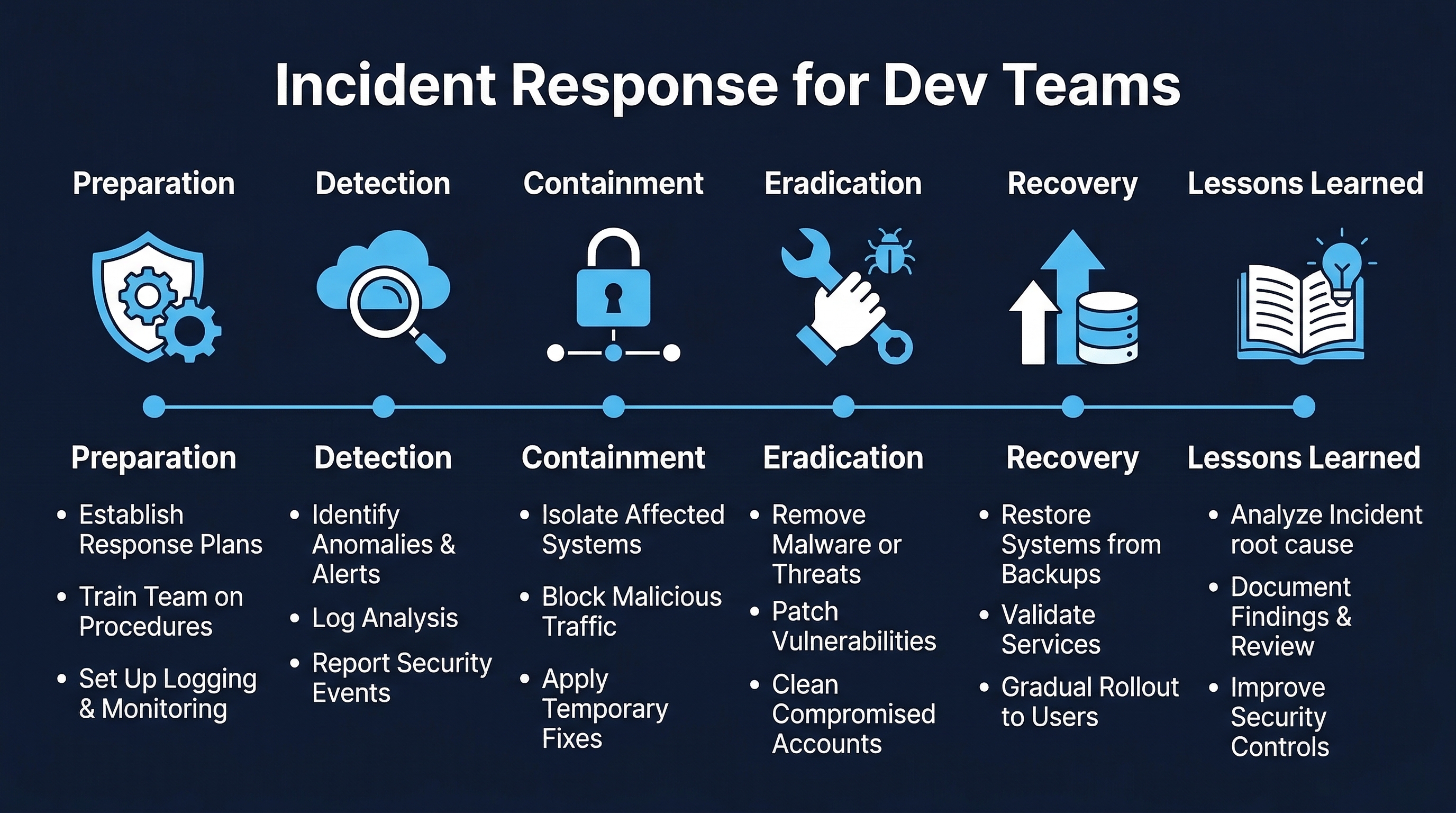 Figure: Incident Response Phases — Detection, triage, containment, investigation, remediation, recovery, and post-incident review
Phase 1: Detection
Detection sources for application security incidents:
Automated monitoring:
- SIEM alerts: correlation rules detecting attack patterns (multiple failed logins, SQL injection signatures, unusual API call patterns).
- WAF alerts: blocked or flagged requests matching attack signatures.
- RASP alerts: runtime detection of exploitation attempts.
- Anomaly detection: ML-based systems identifying behavioral deviations.
- Dependency vulnerability alerts: new CVE published for a production dependency.
Human reporting:
- User reports: customers reporting unexpected behavior or suspicious activity.
- Internal reports: employees noticing something unusual.
- Security researcher reports: external reports through VDP or bug bounty program.
- Threat intelligence: information about active campaigns targeting similar organizations or technologies.
External notification:
- Law enforcement notification of a breach.
- CERT/CC advisory affecting your software.
- Vendor notification of a vulnerability in their product that you use.
- CISA KEV listing for a component in your stack.
- Media report of a breach involving your organization.
Phase 2: Triage
Triage is the first 30 minutes of response. The goal is to answer three questions:
- Is this real? Validate the alert. Check for false positives. Confirm the vulnerability or breach.
- How bad is it? Assign an initial severity using the classification system. This may be adjusted as more information becomes available.
- What is the scope? Which systems are affected? What data is at risk? How many users are impacted?
Triage checklist:
- Alert validated (not a false positive).
- Severity assigned (Sev 1-4).
- Incident commander assigned (Sev 1-2).
- Incident channel created.
- Affected systems identified.
- Initial scope assessment completed.
- Appropriate notifications sent per severity level.
- Evidence preservation initiated.
Phase 3: Containment
Containment stops the bleeding. The goal is to limit the impact of the incident without necessarily fixing the root cause. Speed is critical — containment should happen in minutes, not hours.
Containment techniques for development teams:
- Feature flag disable: If the vulnerable feature is behind a feature flag, disable it immediately. This is the fastest containment method and is instantly reversible.
- WAF rule: Deploy a WAF rule to block the specific attack pattern. Be careful not to block legitimate traffic. Test the rule against known-good requests before deploying widely.
- Rate limiting: If the attack involves high-volume requests, apply aggressive rate limiting to the affected endpoint.
- Access revocation: If compromised credentials are involved, revoke the affected accounts, API keys, tokens, or certificates immediately.
- Network isolation: If the compromised service can be isolated without broader impact, apply network-level controls (security group changes, firewall rules).
- DNS redirect: For severe cases, redirect the affected service’s DNS to a maintenance page.
- Rollback: If the vulnerability was introduced by a recent deployment, roll back to the last known-good version.
- Kill switch: If the service has a kill switch for specific functionality, use it.
Containment documentation: Every containment action must be documented in the incident channel with:
- What was done.
- When it was done.
- Who did it.
- Expected impact on users.
- How to reverse it.
Phase 4: Investigation
Investigation determines what happened, how, and what the full impact is. This phase runs in parallel with containment and remediation.
Timeline reconstruction: Build a chronological timeline of the incident:
- When did the vulnerability or compromise first occur?
- When was it first exploitable?
- When was it first exploited (if applicable)?
- When was it detected?
- What actions did the attacker take?
- What data was accessed, modified, or exfiltrated?
Evidence preservation: Before investigating, ensure evidence is preserved:
- Capture log snapshots (application logs, access logs, audit logs, system logs).
- Preserve database state if relevant (point-in-time snapshots).
- Capture memory dumps if needed for forensic analysis.
- Screenshot relevant dashboards and monitoring views.
- Preserve network captures if available.
- Do not modify or delete anything on affected systems until evidence is collected.
Root cause analysis: Apply the techniques from Module 7.1 (5 Whys, fault tree analysis) to determine the root cause:
- What was the technical root cause of the vulnerability?
- What process failures allowed it to reach production?
- What detection failures allowed it to remain undetected?
- What response failures delayed containment?
Phase 5: Remediation
Remediation is the proper fix, as opposed to the temporary containment measures from Phase 3.
Fix development:
- Develop the fix following standard secure coding practices.
- The fix must address the root cause, not just the specific exploit path.
- Consider whether similar vulnerabilities exist elsewhere in the codebase (variant analysis).
- Follow the rapid patching procedures detailed in Section 5.
Code review:
- Security-focused code review by someone other than the developer who wrote the fix.
- For Sev 1-2 incidents, AppSec team review is required.
- Verify the fix addresses the root cause and does not introduce new vulnerabilities.
Testing:
- Verify the fix resolves the vulnerability.
- Regression testing to ensure no functionality is broken.
- Load testing if the fix changes performance characteristics.
- For Sev 1-2, manual verification by the security team.
Phase 6: Recovery
Recovery is the process of deploying the fix and returning to normal operations.
- Deploy the fix using the normal deployment pipeline (or the emergency change process for Sev 1-2).
- Remove containment measures in a controlled manner (do not remove all mitigations simultaneously).
- Verify the fix is effective in production.
- Monitor for recurrence or new attack patterns.
- Restore any services that were taken offline during containment.
- Communicate resolution to affected users, stakeholders, and leadership.
Phase 7: Post-Incident Review
The post-incident review (blameless post-mortem) is mandatory for all Sev 1-2 incidents and recommended for Sev 3. It must occur within 5 business days of incident closure. Detailed guidance is in Section 6.
5. Rapid Patching Procedures
Normal change management processes are too slow for security emergencies. Organizations must have a defined rapid patching procedure that maintains necessary controls while compressing timelines.
Emergency Change Process
| Aspect | Normal Change | Emergency Change |
|---|---|---|
| Approval | Peer review + manager approval + CAB | Single senior approver (on-call manager or incident commander) |
| Code review | Standard review with feedback cycles | Synchronous review (pair programming or real-time review) |
| Testing | Full test suite + manual QA | Minimum viable testing: unit tests for the fix + smoke tests for core functionality |
| Deployment window | Scheduled release window | Immediate (any time) |
| Documentation | Pre-deployment change record | Post-deployment change record (within 24 hours) |
| Post-review | Standard retrospective | Mandatory post-incident review within 5 days |
Hot Fix Branching Strategy
main ─────────────────────────────────────────────────
  │                                        ↑
  └── hotfix/CVE-2026-XXXXX ──────────────┘
       │   Commit: fix         │  Merge to main
       │   Commit: test        │  Tag: v2.3.1
│ │ Deploy immediately- Branch from the current production tag (not from the development branch).
- Make the minimal change necessary to fix the vulnerability.
- Include tests that verify the fix.
- Synchronous code review.
- Merge to main, tag, and deploy.
- Cherry-pick the fix to any active development branches.
Minimum Viable Testing for Emergency Fixes
For emergency deployments, run the minimum test set that provides confidence without excessive delay:
- Unit tests for the fix: Tests that directly verify the vulnerability is resolved.
- Regression tests for affected functionality: Tests covering the area of the codebase changed by the fix.
- Smoke tests: A small set of tests verifying core application functionality is not broken.
- Security verification: Manual or automated verification that the specific vulnerability is no longer exploitable.
Full test suite execution happens post-deployment as a validation step. If full tests reveal issues, follow up with additional patches.
Coordinated Deployment
For incidents affecting multiple services:
- Sequence deployments. If services have dependencies, deploy in dependency order.
- Canary deployment. Even in emergencies, deploy to a canary or small percentage of traffic first and verify before full rollout. The canary window can be shortened (5-10 minutes instead of the usual 30-60).
- Verify at each stage. Check metrics, error rates, and the vulnerability status after each deployment step.
- Maintain rollback capability. Keep the previous version ready for immediate rollback if the fix causes worse problems than the vulnerability.
6. Blameless Post-Mortems
The blameless post-mortem is the most important artifact of the incident response process. It transforms a painful event into organizational learning.
Principles
Blameless does not mean accountability-free. It means:
- We focus on systems and processes, not individual blame.
- We assume everyone acted with the best information available to them at the time.
- We recognize that human error is a symptom of systemic problems, not a root cause.
- We seek to improve systems so that they are resilient to human error.
- We reward transparency and honesty in post-mortems.
An engineer who made a mistake and is transparent about it is more valuable to the organization than an engineer who hides mistakes out of fear. If post-mortems lead to punishment, people stop reporting honestly, and the organization loses the ability to learn.
Post-Mortem Template
Incident Summary:
- Incident ID and title.
- Severity level.
- Duration: detection time to resolution time.
- Impact: number of users affected, data exposed, financial impact, SLA breach.
Timeline: Minute-by-minute (for Sev 1) or hour-by-hour (for Sev 2-3) chronological account of what happened. Every entry should be factual and attributed.
2026-03-19 14:32 UTC - WAF alert fires on /api/v2/users endpoint (SQL injection signature)
2026-03-19 14:35 UTC - On-call developer Jane acknowledges alert, begins investigation
2026-03-19 14:38 UTC - Jane confirms SQLi is exploitable against production database
2026-03-19 14:40 UTC - Incident declared Sev 1, incident channel #inc-20260319-sqli created
2026-03-19 14:42 UTC - WAF rule deployed to block the specific payload pattern
2026-03-19 14:45 UTC - Database team begins reviewing access logs for evidence of data exfiltration
...
Detection:
- How was the incident detected?
- How long did it take from first exploitation to detection?
- Could we have detected it faster? How?
Impact:
- What was affected? (Services, data, users.)
- What was the business impact? (Revenue, reputation, compliance.)
- What data was compromised, if any?
Root Cause:
- What was the technical root cause?
- Why did it exist?
- Why wasn’t it caught before production?
- 5 Whys analysis or fault tree as appropriate.
What Went Well:
- What aspects of the response worked as designed?
- What tools, processes, or training proved valuable?
- Who went above and beyond?
What Could Be Improved:
- What was slow, confusing, or broken during the response?
- What information was missing?
- What tools or access were lacking?
- What communication was unclear?
Action Items:
Every action item must have an owner and a due date. Action items without owners are wishes, not commitments.
| Action Item | Owner | Due Date | Priority |
|---|---|---|---|
| Add parameterized query linting rule to CI | Alex | 2026-04-02 | High |
| Update code review checklist for SQL injection patterns | Jane | 2026-03-26 | High |
| Add WAF rule for SQLi on all API endpoints | SecOps | 2026-03-22 | Critical |
| Conduct variant analysis of SQL patterns codebase-wide | AppSec | 2026-04-09 | High |
| Update training module on SQL injection prevention | Training | 2026-04-16 | Medium |
Process Improvements: Broader process changes that go beyond fixing this specific incident:
- Should we require SAST scanning for all PRs touching database queries?
- Should we adopt an ORM for all new development to eliminate raw SQL?
- Should we add SQLi-specific monitoring to our SIEM rules?
Sharing Learnings
Post-mortems are only valuable if the learnings spread beyond the immediate team:
- Publish sanitized post-mortems on an internal knowledge base.
- Present significant incidents at engineering all-hands or security sync meetings.
- Extract security lessons into training modules (close the loop from Module 7.1).
- Create “incident of the month” summaries for broad distribution.
- Update runbooks based on lessons learned.
7. Runbooks
A runbook is a documented set of procedures for responding to a specific type of incident or failure mode. Every production service should have a runbook maintained by the owning team.
Runbook Components
Service Overview:
- Service name and description.
- Architecture diagram (components, dependencies, data flows).
- Key personnel and contact information.
- Monitoring dashboards and alert configurations.
Known Failure Modes: For each known failure mode, document:
- Symptoms: What does this failure look like? What alerts fire? What do users report?
- Investigation steps: What logs to check, what queries to run, what dashboards to review.
- Mitigation actions: Immediate actions to limit impact (feature flags, failovers, rate limits).
- Escalation procedures: When and how to escalate, who to involve.
- Recovery procedures: Step-by-step instructions to resolve the issue.
- Key metrics to monitor: What to watch during and after recovery to confirm resolution.
Security-Specific Sections:
- Authentication/authorization failure modes.
- Data exposure scenarios and containment procedures.
- Dependency compromise response (what to do if a third-party library has a critical CVE).
- Secret exposure response (API key leaked, credentials compromised).
- DDoS response procedures.
Runbook Maintenance
Runbooks are living documents. They must be:
- Updated after every incident that reveals gaps or inaccuracies.
- Reviewed quarterly by the owning team to ensure accuracy.
- Tested through game days (see Section 9) to verify procedures work.
- Stored in a location accessible during incidents (not on the service that is down). A separate documentation system, git repository, or incident management platform.
8. AI-Assisted Incident Response
AI is transforming incident response from a purely human-driven process to a human-AI collaborative workflow.
AI for Detection and Triage
AIOps anomaly detection: Machine learning models trained on normal application behavior can detect anomalies that rule-based systems miss. Examples include:
- Unusual API call patterns that deviate from historical baselines.
- Subtle data exfiltration: small but persistent increases in outbound data volume.
- Credential stuffing attacks with realistic IP distribution and timing.
- Insider threat: authorized users accessing data outside their normal patterns.
AI-powered alert correlation: Modern SIEM systems use AI to correlate alerts across multiple sources, reducing alert fatigue:
- Cluster related alerts into a single incident.
- Assess aggregate severity (multiple low alerts may indicate a high-severity attack).
- Identify attack chains spanning multiple services.
- Reduce false positive rates through contextual analysis.
AI for Investigation
Timeline reconstruction: AI can rapidly analyze logs across multiple systems to construct a coherent incident timeline. What would take a human analyst hours of log correlation, an AI system can do in minutes:
- Parse and normalize logs from different formats and time zones.
- Identify relevant events in high-noise log volumes.
- Detect patterns and anomalies in the timeline.
- Generate a narrative summary of what happened.
Impact assessment and blast radius estimation: AI can analyze dependency graphs, data flows, and access patterns to rapidly estimate:
- Which systems were affected.
- What data was potentially exposed.
- How many users were impacted.
- What downstream systems may be compromised.
Hybrid Workflows: AI Recommends, Humans Approve, Systems Execute
The emerging model for AI-assisted incident response follows a pattern described by AWS at re:Invent 2025: AI agents that participate in security workflows as recommenders and automators, with human approval gates for consequential actions.
Pattern:
- AI detects and triages the incident.
- AI recommends containment actions based on the incident type and runbook.
- Human reviews and approves the recommended actions.
- AI or automation systems execute the approved actions.
- AI monitors the results and recommends next steps.
Example: Cayosoft Guardian 7.2 (announced RSA 2026) implements automated rollback for AI identity compromise. When it detects that an AI system’s identity (service account, API key) has been compromised, it automatically rolls back the identity’s permissions to a known-good state, notifies the security team, and provides a remediation plan.
This pattern maintains human oversight while dramatically reducing response time for the mechanical aspects of incident response.
9. AI-Related Security Incidents
Development teams must be prepared to respond to a new category of security incidents specific to AI systems and AI-augmented development.
Incident Type: Prompt Injection Leading to Data Exfiltration
Scenario: An attacker crafts input to your application that contains prompt injection payloads targeting the LLM integrated into your application (e.g., a customer support chatbot, a code generation tool, a data analysis assistant). The injected prompt causes the LLM to exfiltrate sensitive data from its context window.
Response playbook:
- Containment: Disable the AI-powered feature via feature flag or take it offline.
- Evidence: Capture the injected prompt, the LLM’s response, and any data that may have been exposed.
- Impact assessment: Determine what data was in the LLM’s context window and what was exfiltrated. Review LLM API call logs.
- Remediation: Implement input sanitization, output filtering, and prompt hardening. Consider adding a guard LLM to detect injection attempts.
- Post-incident: Update the threat model for AI-integrated features. Add prompt injection test cases to security testing.
Incident Type: AI Tool Compromise
Scenario: A vulnerability is discovered in an AI development tool used by your organization (e.g., CVE-2025-53773, a remote code execution vulnerability in GitHub Copilot extensions). Attackers could exploit this to execute arbitrary code on developers’ machines.
Response playbook:
- Containment: Disable the affected AI tool across the organization. Block the tool’s network endpoints at the firewall level.
- Investigation: Determine which developers were using the affected version. Check for evidence of exploitation (unusual processes, network connections, file modifications on developer machines).
- Impact assessment: Determine whether any developer machines were compromised. Check whether compromised machines had access to production systems, secrets, or sensitive code.
- Remediation: Update to the patched version. If exploitation is confirmed, treat affected developer machines as compromised (reimage, rotate all credentials).
- Post-incident: Review the organization’s AI tool approval process. Ensure security reviews are conducted for all AI tools before deployment.
Incident Type: Shadow AI Data Leakage
Scenario: A developer uses an unapproved AI coding assistant (shadow AI) and submits proprietary source code, internal API schemas, or customer data to a third-party AI service.
Response playbook:
- Assessment: Determine what data was submitted to the AI service. Review the AI service’s data retention and training policies.
- Containment: Block access to the unapproved AI service at the network level. Notify the AI service provider and request data deletion (if their terms allow).
- Impact assessment: Was the data classified as confidential? Does it include customer PII? Does it include intellectual property? Does it include secrets (API keys, credentials)?
- Remediation: If secrets were exposed, rotate them immediately. If customer data was exposed, assess notification requirements under applicable privacy laws.
- Prevention: Deploy DLP controls to detect and block data submission to unapproved AI services. Ensure approved AI tools are easily accessible so developers don’t seek alternatives. Provide training on the AI acceptable use policy.
Incident Type: AI-Generated Code Introduces Production Vulnerability
Scenario: A vulnerability in production is traced to AI-generated code that was accepted by a developer without adequate review. The AI tool suggested code with an SQL injection vulnerability, and it passed code review without detection.
Response playbook:
- Immediate response: Follow standard vulnerability remediation procedures (Module 7.1).
- Variant analysis: Search the codebase for similar patterns that may have been AI-generated. Use git annotations and AI tool telemetry to identify AI-generated code blocks.
- Root cause analysis:
- Why did the AI generate insecure code? (Model limitation, insufficient context, no security guardrails.)
- Why did the developer accept it? (Automation bias, time pressure, lack of security awareness.)
- Why did code review miss it? (Reviewer assumed AI code was safe, no security-focused review, reviewer fatigue.)
- Why did SAST/DAST not catch it? (Rule gap, false negative, tool not configured for this pattern.)
- Systemic fixes: Update AI tool configuration with security guardrails. Require enhanced review for AI-generated code in security-sensitive areas. Add specific SAST rules for patterns commonly generated incorrectly by AI tools. Update training to address automation bias.
Incident Type: MCP Tool Poisoning
Scenario: A Model Context Protocol (MCP) tool server used by the development team is compromised, causing the AI assistant to execute malicious actions through poisoned tool definitions.
Response playbook:
- Containment: Disconnect the compromised MCP server. Revoke any API keys or credentials the MCP server had access to.
- Investigation: Review the MCP server’s tool definitions for unauthorized changes. Check AI assistant logs for actions executed through the compromised tools. Assess what systems the AI assistant interacted with while the tools were poisoned.
- Impact assessment: Determine what malicious actions were executed. Check for data exfiltration, unauthorized code changes, credential theft, or lateral movement.
- Remediation: Redeploy the MCP server from a known-good state. Implement integrity verification for MCP tool definitions. Add monitoring for changes to MCP server configurations.
- Prevention: Implement cryptographic signing of MCP tool definitions. Require human approval for sensitive MCP tool actions. Apply the principle of least privilege to MCP server access.
10. MTTR SLAs by Severity
Mean Time to Remediate (MTTR) targets create accountability for the speed of incident response. These SLAs apply from the time an incident is confirmed to the time a proper fix (not just containment) is deployed to production.
| Severity | MTTR Target | Escalation If Exceeded |
|---|---|---|
| Critical (Sev 1) | 24 hours | VP Engineering + CISO |
| High (Sev 2) | 7 days | Engineering Director + Security Director |
| Medium (Sev 3) | 30 days | Engineering Manager + Security Manager |
| Low (Sev 4) | 90 days or next release | Team Lead |
MTTR tracking:
- Track MTTR for every incident.
- Report monthly on MTTR by severity.
- Identify trends: is MTTR improving, stable, or degrading?
- Benchmark against industry data.
- Investigate outliers: what caused the longest MTTR incidents?
11. Tabletop Exercises and Game Days
Practice builds muscle memory. Incident response procedures that exist only in documentation fail when they are needed most.
Tabletop Exercises
A tabletop exercise is a discussion-based walkthrough of an incident scenario. No actual systems are affected. The team talks through what they would do at each phase.
Frequency: Quarterly for each team.
Format:
- Facilitator presents a scenario (e.g., “Your application’s admin API is being accessed with a stolen service account credential”).
- The team discusses detection: How would we know?
- The team discusses triage: What severity? Who do we call?
- The team discusses containment: What is the fastest way to stop the bleeding?
- The team discusses investigation: What logs do we check? What questions do we ask?
- The team discusses remediation: How do we fix this properly?
- Debrief: What gaps did we identify? What runbook sections need updating?
Game Days (Chaos Engineering for Security)
Game days involve simulated security incidents in controlled environments. Unlike tabletops, game days involve real actions (deploying test payloads, triggering alerts, executing runbook procedures).
Examples:
- Inject a known-safe simulated attack in staging and see if the team detects and responds correctly.
- Simulate a leaked API key and verify the rotation and containment procedures work.
- Trigger a dependency vulnerability alert for a fake CVE and time the response.
- Simulate a prompt injection attempt against the AI-powered features and verify detection and containment.
Rules:
- Always in non-production environments unless specifically designed for production resilience testing.
- Always with advance notice to incident management (to prevent confusion with real incidents).
- Always with a clear scope and rollback plan.
- Debrief after every game day with findings and action items.
Key Takeaways
- Development teams are essential to incident response. App-level security incidents require developer expertise for both investigation and remediation. The SOC cannot fix code.
- Classification drives response. A four-level severity system with defined SLAs, escalation paths, and resource commitments ensures appropriate response for every incident.
- Containment first, fix second. Feature flags, WAF rules, rate limits, and access revocation can stop the bleeding in minutes while a proper fix is developed.
- Blameless post-mortems produce organizational learning. Focus on systems and processes, not individual blame. Every incident is an opportunity to strengthen defenses.
- AI creates both new response capabilities and new incident types. AI-assisted investigation and hybrid workflows accelerate response. Prompt injection, tool compromise, shadow AI, and MCP poisoning are new incident categories that development teams must be prepared for.
- Practice makes proficiency. Tabletop exercises and game days reveal gaps in procedures, tools, and knowledge before real incidents do.
- Runbooks are living documents. Every incident that reveals a gap in the runbook must trigger an update. Runbooks that are not maintained are worse than no runbooks because they create false confidence.
Practical Exercise
Tabletop Scenario:
At 2:47 PM on a Friday, your SIEM fires a high-severity alert: an unusual pattern of API calls is detected against your application’s user data export endpoint. The calls are authenticated with a valid API key belonging to an internal service, but the access pattern is abnormal — the service normally makes 50-100 calls per hour, and in the last 30 minutes it has made 15,000 calls, each requesting a different user’s data export.
Walk through the incident response as a team:
- Triage: What severity do you assign? Why? Who do you notify?
- Containment: What actions do you take in the first 15 minutes?
- Investigation: What logs do you review? What questions do you ask? How do you determine if this is a compromised key, an insider threat, or a malfunctioning service?
- Remediation: Based on different investigation outcomes (compromised key vs. insider vs. malfunction), what does the fix look like for each scenario?
- Recovery: How do you verify the incident is resolved? What monitoring do you add?
- Post-incident: Write the post-mortem timeline and identify three action items with owners and due dates.
References
- CIS Controls v8, Safeguard 16.2: Software Vulnerability Reporting and Response
- CIS Controls v8, Safeguard 16.3: Root Cause and Corrective Action
- NIST SP 800-61r2: Computer Security Incident Handling Guide
- NIST SSDF RV: Respond to Vulnerabilities
- NIST SP 800-218: Secure Software Development Framework
- Google SRE Book, Chapter 15: Postmortem Culture
- PagerDuty Incident Response Documentation: https://response.pagerduty.com/
- Etsy Debriefing Facilitation Guide (Blameless Post-Mortems)
- AWS re:Invent 2025: AI Agents in Security Workflows
Study Guide
Key Takeaways
- Development teams are essential to incident response — Only developers can write, review, test, and deploy code fixes; SOC cannot fix application vulnerabilities.
- Sev 1 response within 15 minutes — Incident commander assigned immediately, executive notification within 1 hour, 24-hour MTTR target.
- Feature flag disable is the fastest containment — Instantly reversible; faster than WAF rules or rollbacks.
- Blameless post-mortems produce learning — Focus on systems and processes; human error is a symptom, not a root cause; transparency must be rewarded.
- Hotfix from production tag, not dev branch — Ensures fix is based on exactly what is running in production.
- AI creates new incident types — Prompt injection, MCP tool poisoning, shadow AI data leakage, and AI-generated code vulnerabilities require specific playbooks.
- Tabletop exercises quarterly — Discussion-based walkthroughs reveal gaps in procedures and runbooks before real incidents do.
Important Definitions
| Term | Definition |
|---|---|
| Incident Commander | Person assigned to coordinate all response activities for Sev 1-2 incidents |
| Blameless Post-Mortem | Review focusing on systems and processes rather than individual blame |
| Runbook | Documented procedures for responding to specific incident types or failure modes |
| MCP Tool Poisoning | Compromised MCP server causing AI assistant to execute malicious actions via poisoned tool definitions |
| Shadow AI | Unapproved AI tools adopted by developers without organizational approval |
| Evidence Preservation | Capturing logs, database state, memory dumps, and screenshots before modifying anything |
| Emergency Change | Single senior approver, synchronous code review, minimum viable testing, mandatory post-review |
| Tabletop Exercise | Discussion-based walkthrough of incident scenario without affecting real systems |
| Game Day | Simulated security incident in controlled environment involving real actions |
| Variant Analysis | Searching codebase for similar patterns after finding a vulnerability |
Quick Reference
- Severity Response Times: Sev 1 = 15 min (BH) / 30 min (ABH), Sev 2 = 1 hour / 4 hours, Sev 3 = 4 BH, Sev 4 = normal sprint
- MTTR Targets: Sev 1 = 24 hours, Sev 2 = 7 days, Sev 3 = 30 days, Sev 4 = 90 days
- Escalation Levels: L1 on-call dev, L2 team lead + security contact, L3 eng manager + AppSec, L4 VP Engineering + CISO
- Containment Priority: Feature flag > WAF rule > Rate limit > Access revocation > Network isolation > Rollback
- Common Pitfalls: Investigating before containing, modifying evidence before preservation, blame-focused post-mortems, no runbooks, hotfixing from dev branch instead of production tag
Review Questions
- Why must development teams be part of incident response, and what specific capabilities do they provide that SOC teams cannot?
- Walk through the seven IR phases for a SQL injection actively exfiltrating customer data, specifying dev team actions at each phase.
- How does a blameless post-mortem differ from traditional incident reviews, and why does blame-based culture reduce organizational learning?
- Design a response playbook for an MCP tool poisoning incident where a compromised server causes an AI assistant to exfiltrate code.
- A production vulnerability is traced to AI-generated code accepted without review — conduct a root cause analysis identifying systemic fixes.