6.1 — Pipeline Security
Listen instead
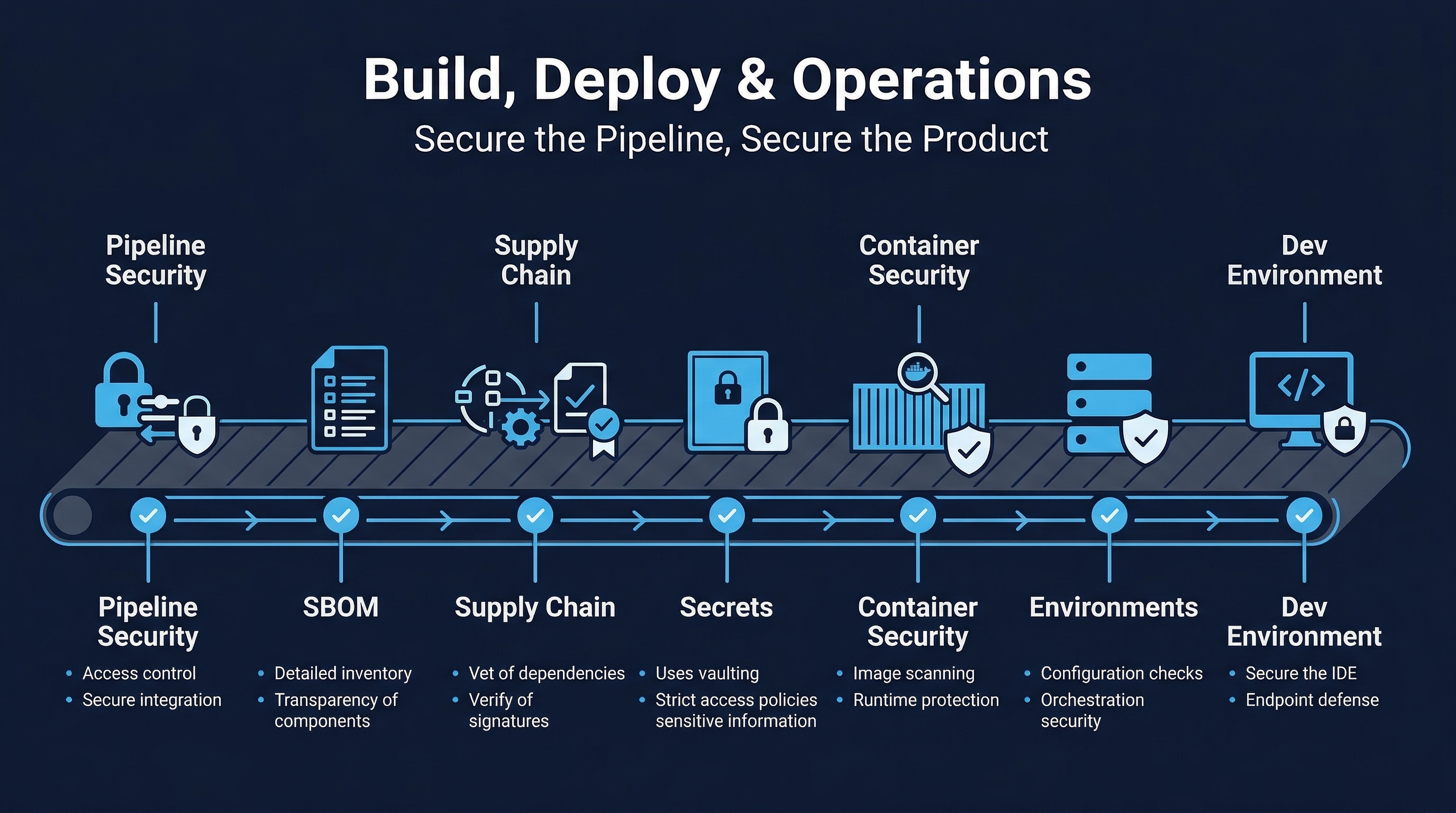 Figure: Build, Deploy & Operations Overview — Track 6 coverage of pipeline security, artifact integrity, and infrastructure hardening
Introduction
The CI/CD pipeline is the factory floor of modern software development. Every line of code, every dependency, every configuration change flows through it on its way to production. This makes the pipeline one of the most consequential attack surfaces in any organization. A compromised pipeline does not just affect one application — it can inject malicious code into every build, every artifact, every deployment across the entire organization. The SolarWinds SUNBURST attack demonstrated this with devastating clarity: attackers compromised the build system and injected a backdoor into a legitimate software update that was distributed to 18,000 organizations, including multiple US government agencies.
CIS Control 16.1 requires organizations to establish and maintain a secure application development process. The CI/CD pipeline is the engine that enforces that process. CIS Control 16.12 demands code-level security checks — the pipeline is where those checks execute. If the pipeline itself is not secure, every security gate it contains is potentially compromised. You cannot trust the output of a system whose integrity you cannot verify.
This module covers pipeline hardening, security scanning stages, secrets management within pipelines, configuration security, and the emerging role of AI in pipeline optimization and anomaly detection.
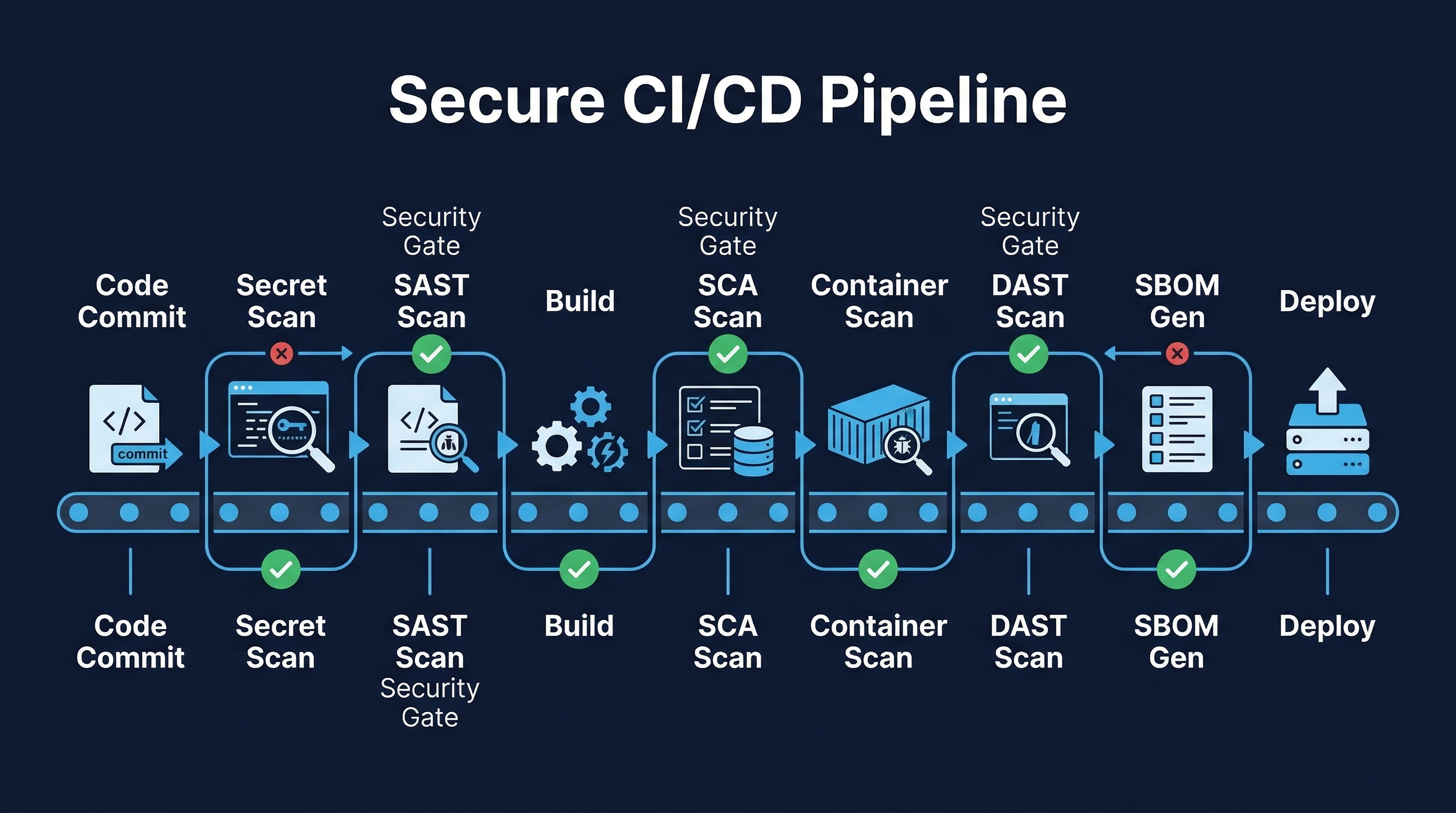 Figure: Secure CI/CD Pipeline — Security scanning stages and hardening controls across the build and deploy process
The CI/CD Pipeline as an Attack Surface
Why Attackers Target Pipelines
Pipelines are high-value targets for several reasons:
- Amplification: A single compromise can affect every build and deployment. One poisoned pipeline stage can inject malware into hundreds of releases.
- Trust inheritance: Artifacts produced by CI/CD systems are trusted by downstream systems. If the pipeline signs an artifact, deployment systems accept it.
- Credential concentration: Pipelines hold credentials for source control, artifact registries, cloud providers, production environments, and secrets vaults. A compromised pipeline may have more access than any individual developer.
- Stealth: Malicious modifications to build processes can be subtle — a single line added to a build script that downloads and executes a payload, or a dependency substitution that replaces a legitimate package with a trojanized version.
- Persistence: Build system compromises can persist across deployments because they inject at the source, not at the destination.
Real-World Pipeline Attacks
SolarWinds (2020): Attackers compromised the Orion build system and injected the SUNBURST backdoor into legitimate updates. The malicious code was signed with SolarWinds’ own certificate and distributed through their official update channel. Detection took months.
Codecov (2021): Attackers modified the Bash Uploader script used by thousands of CI pipelines to exfiltrate environment variables — including credentials, tokens, and keys — from every CI build that used it.
ua-parser-js (2021): A compromised npm maintainer account was used to publish malicious versions of a package downloaded 8 million times per week. CI/CD pipelines that pulled the latest version automatically built and deployed the compromised code.
3CX (2023): A supply chain attack through a compromised upstream dependency (Trading Technologies) led to the distribution of trojanized desktop applications to 600,000 customers. The build pipeline was the vector.
xz Utils (2024): A multi-year social engineering campaign to gain maintainer access to a critical compression library, with backdoor code inserted through the build system that would have compromised SSH on most Linux distributions.
Pipeline Hardening Requirements
Pipeline-as-Code in Version Control
Every pipeline configuration must be stored as code in the same version control system as the application it builds:
- All pipeline definitions in VCS:
.github/workflows/,.gitlab-ci.yml,Jenkinsfile,azure-pipelines.yml,bitbucket-pipelines.yml— all committed, versioned, and auditable. - Same review and approval standards as application code: Pipeline changes require pull request review, approval from designated reviewers, and passing automated checks before merge.
- Branch protection on pipeline files: Changes to pipeline definitions on protected branches require the same (or stricter) approval gates as production code.
- Change history: Every modification to pipeline configuration is tracked with author, timestamp, reviewer, and approval record. This creates an audit trail for compliance and incident investigation.
# Example: GitHub branch protection for pipeline files
# .github/CODEOWNERS
/.github/workflows/ @security-team @devops-leads
/Dockerfile @security-team @devops-leads
/docker-compose*.yml @security-team @devops-leads
Least Privilege Service Accounts
Pipeline service accounts are among the most powerful identities in any organization. They must be constrained:
- No admin access to production: Build pipelines should never run with production administrator credentials. Use scoped tokens that permit only the specific actions required (push to artifact registry, deploy to specific namespace, read secrets for specific paths).
- Separate accounts per pipeline stage: The account that runs SAST does not need deployment permissions. The account that deploys to staging does not need production access.
- Short-lived credentials: Use OIDC token exchange to obtain temporary credentials from cloud providers rather than storing long-lived API keys. GitHub Actions OIDC federation, GitLab CI JWT tokens, and similar mechanisms eliminate the need for persistent secrets.
- Regular review: Audit pipeline service account permissions quarterly. Remove unused accounts immediately.
# GitHub Actions: OIDC for AWS — no long-lived credentials
permissions:
  id-token: write
  contents: read

steps:
  - uses: aws-actions/configure-aws-credentials@v4
    with:
      role-to-assume: arn:aws:iam::123456789012:role/GitHubActionsDeployRole
      aws-region: us-east-1
      # No access keys stored anywhere
Network Isolation of Build Agents
Build agents must be isolated from production systems:
- Separate network segments: Build agents run in a dedicated VPC/VLAN with no direct network path to production workloads. Communication flows through controlled, audited interfaces (artifact registry, deployment API).
- Egress filtering: Build agents should only reach approved registries and services. Block direct internet access; route through artifact proxy/cache.
- No inbound access: Build agents should not accept inbound connections from the internet or from other network segments except the CI/CD orchestrator.
- Monitoring: Network traffic from build agents is logged and monitored for anomalies — unexpected destinations, unusual data volumes, connections to known-bad IPs.
Ephemeral Build Agents
Build agents should be created fresh for each build and destroyed afterward:
- No persistent state: Each build starts from a known-good image. No leftover artifacts, cached credentials, or modified configurations from previous builds.
- Prevents lateral movement: Even if one build is compromised, the attacker’s foothold is destroyed when the agent terminates.
- Reduces secret exposure: Credentials injected during a build are available only for the lifetime of that build, not persisted on disk.
- Implementation: Use container-based runners (GitHub Actions hosted runners, GitLab SaaS runners), Kubernetes-based executors, or cloud auto-scaling groups with terminate-on-complete policies.
# GitLab CI: ephemeral Kubernetes runner
runners:
  config: |
    [[runners]]
      [runners.kubernetes]
        image = "ubuntu:22.04"
        privileged = false
        [runners.kubernetes.pod_security_context]
          run_as_non_root = true
          run_as_user = 1000
Audit Logging
Every pipeline action must be logged:
- Execution logs: Who triggered the build, what commit, what branch, what configuration version, what parameters.
- Configuration changes: Who modified pipeline definitions, when, what changed, who approved.
- Approval records: Who approved deployments, when, with what justification.
- Secret access: Which secrets were accessed during the build, by which stage.
- Artifact actions: What was built, what was signed, what was published, where.
- Retention: Logs retained for minimum 1 year (align with organizational and regulatory requirements).
No Interactive Access During Builds
Builds must be fully automated with no manual intervention during execution:
- No SSH/exec into running build agents: If a build needs debugging, the logs are the diagnostic tool. Interactive access creates opportunities for unaudited modifications.
- No manual file modifications: All build inputs come from version control, artifact registries, or secrets managers — never from someone typing on a keyboard.
- Reproducibility: Any build should produce the same output given the same inputs. Interactive modifications break reproducibility and auditability.
OWASP CI/CD Security Top 10
The OWASP CI/CD Security project identifies the most critical risks in CI/CD pipelines:
- CICD-SEC-1: Insufficient Flow Control Mechanisms — Lack of enforcement mechanisms to ensure code and artifacts pass required checks. A developer can push directly to production branch bypassing all gates.
- CICD-SEC-2: Inadequate Identity and Access Management — Overly permissive identities, stale accounts, lack of MFA on CI/CD platforms.
- CICD-SEC-3: Dependency Chain Abuse — Pulling poisoned dependencies during build.
- CICD-SEC-4: Poisoned Pipeline Execution (PPE) — Attacker modifies pipeline definition to execute arbitrary code. This includes Direct PPE (modify pipeline file in repo), Indirect PPE (modify files referenced by pipeline), and Public PPE (submit PR with modified pipeline to public repo).
- CICD-SEC-5: Insufficient PBAC (Pipeline-Based Access Controls) — Pipelines accessing resources they should not reach.
- CICD-SEC-6: Insufficient Credential Hygiene — Secrets in plaintext, overly scoped credentials, long-lived tokens.
- CICD-SEC-7: Insecure System Configuration — Default configurations, unpatched CI/CD platforms, excessive permissions on self-hosted runners.
- CICD-SEC-8: Ungoverned Usage of 3rd Party Services — Third-party integrations with excessive permissions (GitHub Apps, webhooks, marketplace actions).
- CICD-SEC-9: Improper Artifact Integrity Validation — No verification of artifact signatures or provenance before deployment.
- CICD-SEC-10: Insufficient Logging and Visibility — Inability to detect and investigate pipeline compromises.
Pipeline Security Scanning Stages
A mature pipeline implements security checks at every stage. The complete flow:
Stage 1: Commit — Pre-Commit Hooks
Before code even reaches the repository:
- Secret scanning: Detect API keys, passwords, tokens, private keys before they enter version history. Tools: GitLeaks, git-secrets, detect-secrets.
- Linting and formatting: Enforce code style, catch common errors, flag dangerous patterns. Tools: ESLint, Pylint, RuboCop, golangci-lint.
- Conventional commit enforcement: Ensure commit messages follow standards for automated changelog generation.
# .pre-commit-config.yaml
repos:
  - repo: https://github.com/gitleaks/gitleaks
    rev: v8.18.0
    hooks:
      - id: gitleaks
  - repo: https://github.com/pre-commit/pre-commit-hooks
    rev: v4.5.0
    hooks:
      - id: check-added-large-files
        args: ['--maxkb=500']
      - id: detect-private-key
      - id: check-merge-conflict
Stage 2: Build — Static Analysis
During the build process:
- SAST (Static Application Security Testing): Analyze source code for vulnerabilities without executing it. Tools: Semgrep, CodeQL, SonarQube, Checkmarx, Fortify.
- SCA (Software Composition Analysis): Identify known vulnerabilities in dependencies. Tools: Snyk, Dependabot, Grype, OWASP Dependency-Check.
- License compliance: Verify all dependencies use approved licenses. Block builds with GPL/AGPL dependencies in proprietary software without explicit approval.
- SBOM generation: Create a complete bill of materials for the build. Tools: Syft, Trivy, CycloneDX CLI.
# GitHub Actions: Build stage security checks
build:
  runs-on: ubuntu-latest
  steps:
    - uses: actions/checkout@v4
    - name: SAST - Semgrep
      uses: semgrep/semgrep-action@v1
      with:
        config: p/owasp-top-ten p/cwe-top-25
    - name: SCA - Snyk
      uses: snyk/actions/node@master
      with:
        args: --severity-threshold=high
    - name: SBOM Generation
      run: syft . -o cyclonedx-json > sbom.json
    - name: License Check
      run: license-checker --failOn "GPL-2.0;GPL-3.0;AGPL-3.0"
Stage 3: Test — Dynamic Analysis
Against a running application:
- Unit tests: Verify individual components function correctly. Security-relevant: input validation, authentication logic, authorization checks.
- Integration tests: Verify components interact correctly. Security-relevant: API contract testing, authentication flows, data isolation between tenants.
- DAST (Dynamic Application Security Testing): Test the running application for vulnerabilities. Tools: OWASP ZAP, Burp Suite Enterprise, Nuclei. Run against staging environment with production-like configuration.
Stage 4: Package — Artifact Security
When creating deployable artifacts:
- Container scanning: Scan built container images for OS and application vulnerabilities. Tools: Trivy, Grype, Snyk Container, Anchore.
- Artifact signing: Cryptographically sign all artifacts to ensure integrity and provenance. Tools: Cosign (Sigstore), Docker Content Trust.
- Provenance generation: Create attestations documenting how the artifact was built, from what source, by which pipeline, with what dependencies. SLSA provenance predicates.
# Container scan and sign
- name: Scan Container Image
  run: trivy image --severity HIGH,CRITICAL --exit-code 1 $IMAGE
- name: Sign Container Image
  run: cosign sign --yes $IMAGE@$DIGEST
- name: Generate SLSA Provenance
  uses: slsa-framework/slsa-github-generator/.github/workflows/generator_container_slsa3.yml@v2.0.0
Stage 5: Deploy — Verification and Gates
Before and during deployment:
- Signature verification: Deployment systems verify artifact signatures before accepting any artifact. Unsigned or invalid signatures are rejected.
- Policy-as-code gates: Open Policy Agent (OPA), Kyverno, or similar enforce deployment policies: no critical vulnerabilities, required labels, resource limits, network policies present.
- Approval workflows: Human approval required for production deployments (with emergency bypass procedures for critical incidents).
# OPA policy: block deployment with critical CVEs
deny[msg] {
  input.kind == "Deployment"
  vuln := input.metadata.annotations["scan.results/critical"]
  to_number(vuln) > 0
  msg := sprintf("Deployment blocked: %d critical vulnerabilities", [to_number(vuln)])
}
Stage 6: Runtime — Continuous Security
After deployment:
- RASP (Runtime Application Self-Protection): Monitor application behavior at runtime and block attacks. Tools: Contrast Security, Sqreen/Datadog.
- Continuous monitoring: Track error rates, latency, resource usage for anomalies that may indicate compromise.
- Vulnerability scanning of deployed dependencies: Running applications may use dependencies that develop new CVEs after deployment. Continuous scanning identifies these.
Secrets in Pipelines
Secrets are the most sensitive data in any pipeline. Mishandling them is the most common pipeline security failure.
Rules for Pipeline Secrets
Never in pipeline definitions or environment variables visible in logs:
- Do not put secrets in
.github/workflows/*.yml,.gitlab-ci.yml,Jenkinsfile, or any committed file. - Do not set secrets as plain environment variables that appear in build logs. Even “masked” variables can leak through error messages, debug output, or command-line arguments visible in process listings.
Use OIDC token exchange over long-lived credentials:
- GitHub Actions, GitLab CI, CircleCI, and most modern CI systems support OIDC federation with cloud providers (AWS, Azure, GCP). The pipeline receives a short-lived, automatically scoped token. No secrets to store, rotate, or leak.
Vault and cloud KMS integration:
- For secrets that must be stored (database passwords, API keys), use a dedicated secrets manager (HashiCorp Vault, AWS Secrets Manager, Azure Key Vault) and retrieve them at runtime through authenticated API calls.
- The pipeline authenticates to the vault using OIDC or platform identity, not stored credentials.
Secret masking in CI output:
- All CI platforms offer secret masking that redacts known secret values from log output. Enable it, but do not rely on it as your only protection — masking can be bypassed through encoding, splitting, or error messages.
# GitLab CI: Vault integration
read_secrets:
  id_tokens:
    VAULT_ID_TOKEN:
      aud: https://vault.example.com
  secrets:
    DATABASE_PASSWORD:
      vault: production/db/password@secret
      token: $VAULT_ID_TOKEN
Pipeline Configuration Security
Protecting Pipeline Definition Files
Pipeline definitions (.github/workflows/, .gitlab-ci.yml, Jenkinsfile) are as critical as the code they build:
- CODEOWNERS enforcement: Require security team or DevOps lead approval for any changes to pipeline definitions.
- Branch protection: Pipeline definitions on protected branches cannot be modified without required reviews.
- Audit trail: Every change to pipeline configuration is logged with author, reviewer, and approval timestamp.
Pin Action/Plugin Versions by SHA
Mutable tags (like @v4 or @latest) can be changed by the action maintainer — or by an attacker who compromises their account:
# BAD: Mutable tag — could change to malicious code at any time
- uses: actions/checkout@v4

# GOOD: Pinned by SHA — immutable, auditable
- uses: actions/checkout@b4ffde65f46336ab88eb53be808477a3936bae11 # v4.1.1- Use Dependabot or Renovate to automate SHA pin updates when new versions are released.
- Verify the SHA corresponds to the expected version before adopting it.
Limit Self-Hosted Runner Exposure
Self-hosted runners execute code from pull requests and branches. If misconfigured, they can be exploited:
- Never use self-hosted runners on public repositories: Any external contributor can submit a PR that executes arbitrary code on your runner.
- Use ephemeral runners: Configure auto-scaling runners that are destroyed after each job.
- Network isolation: Self-hosted runners should be in a dedicated network segment with limited access to internal resources.
- Label-based access: Restrict which workflows can use specific runners based on labels and repository settings.
Platform-Specific Best Practices
GitHub Actions Security
- Enable required workflows for security checks across the organization.
- Use environments with protection rules for production deployments (required reviewers, deployment branches, wait timer).
- Configure OIDC for cloud provider authentication — eliminate stored cloud credentials.
- Enable Dependabot for action version updates with SHA pinning.
- Use reusable workflows from a centralized security repository for consistent security gates.
- Restrict GITHUB_TOKEN permissions to minimum required (read-only default, explicit write permissions per job).
- Enable artifact attestations for provenance (GitHub’s built-in SLSA support).
GitLab CI Security
- Use protected variables (only available on protected branches/tags).
- Enable merge request approvals for pipeline definition changes.
- Configure compliance frameworks and compliance pipelines that inject required security stages.
- Use group-level variables for organization-wide configuration with appropriate masking and protection.
- Enable job token scope limiting to restrict CI_JOB_TOKEN access to only required projects.
- Use security scanning templates from GitLab’s maintained template library.
Jenkins Security
- Enable Role-Based Access Control (RBAC) via the Role Strategy Plugin or Matrix Authorization.
- Use Pipeline: Groovy Sandbox to restrict what Jenkinsfile code can execute.
- Configure Folder-level credentials rather than global credentials.
- Enable the Audit Trail plugin for complete logging.
- Use Configuration as Code (JCasC) for Jenkins configuration management.
- Run agents with minimal permissions and in containers for isolation.
- Disable script console access for non-administrators.
- Keep Jenkins and all plugins updated — Jenkins plugins are a frequent attack vector.
AI in CI/CD
AI-Based Pipeline Optimization
AI is increasingly used to make pipelines faster and more efficient:
- Build failure prediction: ML models trained on build history predict which commits are likely to fail, allowing prioritization of testing resources. Google’s internal tools report up to 60% reduction in wasted build time.
- Test selection: AI identifies which tests are most likely to catch regressions for a given code change, running those first. Facebook’s Predictive Test Selection reduced test suite execution time by 70% while maintaining defect detection.
- Resource optimization: ML models predict resource requirements for builds and dynamically allocate compute, reducing both cost and queue times.
- Flaky test detection: AI identifies tests that produce inconsistent results, automatically quarantining them and flagging for developer attention.
AIOps for Anomaly Detection
AIOps platforms apply machine learning to operational data to detect anomalies during and after deployments:
- Datadog Watchdog: Uses unsupervised ML to automatically detect anomalies in application metrics, logs, and traces. During deployments, it correlates changes in error rates, latency, and throughput with the deployment event.
- Deployment correlation: AI systems automatically link metric anomalies to specific deployments, reducing mean time to detect (MTTD) from hours to minutes.
- Predictive alerting: Rather than alerting on static thresholds, AI models learn normal behavior patterns and alert on deviations — catching subtle issues that fixed thresholds miss.
AI-Driven Vulnerability Scanning
AI enhances traditional scanning in the pipeline:
- AI-augmented SAST: Tools like Semgrep with AI rules and CodeQL with ML-enhanced taint analysis identify vulnerability patterns that rule-based engines miss. Context-aware analysis reduces false positives by up to 40%.
- Intelligent prioritization: AI models assess vulnerability severity in context — a SQL injection in an internet-facing endpoint is prioritized over the same pattern in an internal batch job.
- Automated fix suggestions: When vulnerabilities are found, AI generates remediation suggestions integrated into the developer’s workflow (PR comments, IDE notifications).
Automated Rollback and Self-Healing
As of 2026, 74.7% of organizations use automated rollback mechanisms triggered by deployment anomalies. This represents a significant maturation of deployment safety:
- Automated rollback triggers: Error rate exceeds baseline by X%, latency increases beyond threshold, health checks fail, synthetic monitors report failures.
- Self-healing security (emerging 2026): The next frontier — systems that automatically detect a vulnerability in production, generate a fix, test it, and deploy it for low-risk issues without human intervention. Current implementations are limited to well-understood vulnerability classes (dependency updates, configuration drift remediation).
- Hybrid workflows: The predominant model: “AI recommends, humans approve, systems execute.” AI detects the issue, proposes the action, a human confirms, and automation carries it out. This preserves human judgment while leveraging AI speed.
Implementation Checklist
| Control | Priority | Status |
|---|---|---|
| Pipeline definitions in version control | Critical | |
| CODEOWNERS for pipeline files | Critical | |
| Branch protection on pipeline definitions | Critical | |
| OIDC for cloud authentication (no stored creds) | Critical | |
| Ephemeral build agents | High | |
| Secret masking enabled | High | |
| SAST in build stage | Critical | |
| SCA in build stage | Critical | |
| SBOM generation per release | High | |
| Container scanning before deployment | High | |
| Artifact signing | High | |
| Signature verification at deployment | High | |
| Policy-as-code gates before production | High | |
| Action/plugin versions pinned by SHA | High | |
| Audit logging of all pipeline activity | High | |
| Network isolation of build agents | Medium | |
| DAST against staging | Medium | |
| AI-based anomaly detection on deploys | Medium | |
| Automated rollback on anomaly | Medium | |
| Runtime vulnerability scanning | Medium |
Key Takeaways
- The pipeline is the most consequential attack surface: A compromised pipeline can inject malicious code into every build across the organization. Secure it with the same rigor as production systems.
- Pipeline-as-code with review gates: Pipeline definitions are code. They deserve the same review, approval, and protection as the application code they build.
- Layered security scanning: Security checks at every stage — commit, build, test, package, deploy, runtime — create defense in depth that no single bypass can defeat.
- OIDC over stored secrets: Short-lived, automatically scoped credentials from OIDC federation eliminate the most common class of pipeline secrets exposure.
- Pin by SHA, not tag: Mutable version tags are a supply chain risk. Pin actions and plugins by commit SHA and automate updates.
- AI augments, humans govern: AI-based pipeline optimization, anomaly detection, and automated rollback are powerful tools, but the “AI recommends, humans approve, systems execute” model remains the responsible standard.
References
- OWASP CI/CD Security Top 10: https://owasp.org/www-project-top-10-ci-cd-security-risks/
- CIS Controls v8, Control 16: Application Software Security
- NIST SSDF (SP 800-218): Secure Software Development Framework
- SLSA Framework: https://slsa.dev/
- Sigstore Project: https://sigstore.dev/
- GitHub Actions Security Hardening: https://docs.github.com/en/actions/security-guides
Study Guide
Key Takeaways
- Pipeline is the most consequential attack surface — A single compromise can inject malicious code into every build (SolarWinds affected 18,000 orgs).
- Pipeline-as-code with review gates — Pipeline definitions must be in VCS with same review/approval as application code; CODEOWNERS on pipeline files.
- OIDC over stored secrets — Short-lived, automatically scoped credentials eliminate the most common class of pipeline secrets exposure.
- Pin by SHA, not tag — Mutable tags like @v4 can be changed by maintainers or attackers; SHA pinning ensures immutable, auditable code.
- Ephemeral build agents — Created fresh per build, destroyed afterward; prevents persistence of compromised state between builds.
- Layered scanning at every stage — Commit (secrets), Build (SAST/SCA/SBOM), Test (DAST), Package (container scan/sign), Deploy (verify/gates), Runtime (RASP/monitoring).
- AI recommends, humans approve, systems execute — Predominant model for deployment safety; 74.7% of orgs use automated rollback as of 2026.
Important Definitions
| Term | Definition |
|---|---|
| Poisoned Pipeline Execution (PPE) | Attacker modifies pipeline definitions to execute arbitrary code (CICD-SEC-4) |
| OIDC Token Exchange | CI platform issues short-lived token proving build identity; no stored credentials needed |
| Ephemeral Build Agents | Build runners created fresh per build and destroyed afterward |
| SLSA Provenance | Attestation documenting how an artifact was built, from what source, by which pipeline |
| CODEOWNERS | File specifying required reviewers for changes to specific paths (e.g., pipeline files) |
| Artifact Signing | Cryptographic binding of artifact to its creator using Cosign/Sigstore |
| Policy-as-Code | OPA/Kyverno rules enforcing deployment policies automatically |
| OWASP CICD Top 10 | Ten most critical risks in CI/CD pipelines |
| AIOps | ML applied to operational data for anomaly detection during deployments |
| Self-Healing Security | Systems that detect, generate fixes, test, and deploy for low-risk vulnerability classes |
Quick Reference
- OWASP CICD Top 10: Insufficient flow control, Inadequate IAM, Dependency chain abuse, PPE, Insufficient PBAC, Credential hygiene, Insecure config, Ungoverned 3rd party, Improper artifact integrity, Insufficient logging
- Scanning Stages: Pre-commit (secrets) -> Build (SAST/SCA) -> Test (DAST) -> Package (container scan/sign) -> Deploy (verify/gates) -> Runtime (RASP)
- Key Stats: 74.7% use automated rollback (2026), 60% build time reduction with AI test selection
- Common Pitfalls: Storing long-lived credentials in pipelines, using mutable action tags, persistent build agents, no signature verification at deploy, self-hosted runners on public repos
Review Questions
- How does OIDC token exchange eliminate the need for stored credentials, and what happens if the CI platform is compromised?
- Explain the difference between Direct PPE, Indirect PPE, and Public PPE with an example of each.
- Design a complete pipeline security scanning strategy for a containerized microservice, specifying tools and gates at each stage.
- Why must pipeline definition files receive the same or stricter review as application code?
- How would you implement the “AI recommends, humans approve, systems execute” model for production deployment decisions?