6.5 — Infrastructure Hardening & Container Security
Listen instead
Introduction
Application security does not end at the code boundary. The most secure application in the world is worthless if it runs on an unpatched server with default credentials, in a misconfigured container with root access, on a network with no segmentation. CIS Control 16.7 requires organizations to use industry-standard hardening configuration templates for all application infrastructure — servers, databases, web servers, containers, PaaS, and SaaS. And critically: custom development must not weaken the hardening that infrastructure teams establish.
Infrastructure as Code (IaC) has fundamentally changed how infrastructure is provisioned and managed. Infrastructure is now software — and it inherits all the security challenges of software: bugs, misconfigurations, vulnerabilities in dependencies, and the need for review, testing, and continuous monitoring. When AI tools generate IaC templates, they introduce the same category of risks that AI-generated application code does — overly permissive defaults, missing encryption, and security-irrelevant-seeming decisions that create significant exposure.
This module covers IaC security, hardening standards, container security best practices, and the specific risks of AI-generated infrastructure code.
CIS Control 16.7: Hardening Configuration Templates
The control states:
Use industry-standard hardening configuration templates for enterprise assets. Periodically review and update to reflect the latest information. Review software configurations and controls during software development to ensure that development does not weaken the hardening.
Key requirements:
- Industry-standard templates: Do not invent hardening standards from scratch. Use CIS Benchmarks, DISA STIGs, or vendor hardening guides as your baseline.
- Periodic review and update: Hardening standards evolve. New attack techniques, new features, new defaults — templates must be updated at least annually and whenever significant changes occur.
- Development must not weaken hardening: This is the critical intersection with SSDLC. Developers requesting “open port 0.0.0.0/0” or “disable SELinux” to make their application work are weakening infrastructure hardening. These requests must be evaluated, documented, and approved (or denied) through a formal exception process.
Infrastructure as Code (IaC)
Principles
All infrastructure must be defined in version-controlled code:
Terraform:
# Example: AWS VPC with private subnets
resource "aws_vpc" "main" {
  cidr_block           = "10.0.0.0/16"
  enable_dns_hostnames = true
  enable_dns_support   = true

  tags = {
    Name        = "production-vpc"
    Environment = "production"
    ManagedBy   = "terraform"
  }
}

resource "aws_subnet" "private" {
  count             = 3
  vpc_id            = aws_vpc.main.id
  cidr_block        = cidrsubnet(aws_vpc.main.cidr_block, 8, count.index)
  availability_zone = data.aws_availability_zones.available.names[count.index]

  # Private subnet — no public IP assignment
  map_public_ip_on_launch = false
}
Pulumi (programming language-native):
import pulumi_aws as aws

vpc = aws.ec2.Vpc("main",
    cidr_block="10.0.0.0/16",
    enable_dns_hostnames=True,
    enable_dns_support=True,
)
CloudFormation (AWS-native), Ansible (configuration management), Helm (Kubernetes packaging) — each has its place. The critical principle is: no manual changes. Everything in code, everything reviewed, everything versioned.
IaC Review and Approval
IaC changes follow the same process as application code:
- Feature branch: All changes on branches, never directly to main.
- Pull request: With description of what is changing and why.
- Automated checks: Linting, security scanning, plan/preview (see what will change before applying).
- Peer review: By someone with infrastructure expertise who understands the security implications.
- Approval: Required reviewers must approve before merge.
- Apply: Automated application from the main branch. No manual
terraform applyfrom laptops.
No Manual Changes (Drift Detection)
Manual changes to infrastructure (logging into the console and clicking) create drift — the actual state diverges from the code. Drift is a security risk because:
- Unreviewed changes: Manual changes bypass all review and approval gates.
- Unaudited: Manual changes may not appear in audit logs the same way IaC changes do.
- Unreproducible: If the environment must be rebuilt, manual changes are lost.
- Conflicting: The next IaC apply may overwrite manual changes, or worse, fail because the state does not match expectations.
Detection: Use tools like terraform plan (shows differences between code and reality), Driftctl, AWS Config, or Azure Policy to detect drift.
Remediation: When drift is detected, either update the IaC to match the desired state (if the manual change was intentional and approved) or revert the manual change to match the IaC.
State File Security
Terraform state files contain the full state of managed infrastructure, including sensitive values:
- Encrypted at rest: State files stored in encrypted backends (S3 with SSE, Azure Blob with encryption, GCS with CMEK).
- Access controlled: Only the CI/CD pipeline and designated administrators should have access to state files. No developer read access.
- State locking: Prevent concurrent applies that could corrupt state (DynamoDB for S3 backend, Azure Blob lease, GCS object versioning).
- No local state in production: Always use remote backends with encryption and access control.
IaC Security Scanning
Tools
Checkov (Bridgecrew/Palo Alto):
- Scans Terraform, CloudFormation, Kubernetes manifests, Dockerfiles, Helm charts, ARM templates.
- 1,000+ built-in policies covering CIS Benchmarks, SOC 2, PCI-DSS, HIPAA, NIST 800-53.
- Custom policy support.
# Scan Terraform directory
checkov -d ./terraform/ --framework terraform

# Output: Passed: 47, Failed: 3, Skipped: 0
# CKV_AWS_19: FAILED - S3 bucket encryption not enabled
# CKV_AWS_21: FAILED - S3 bucket versioning not enabled
# CKV_AWS_18: FAILED - S3 access logging not enabled
tfsec (Aqua Security):
- Terraform-specific scanner with deep HCL understanding.
- Resolves Terraform modules and variables for accurate analysis.
- Integrated into VS Code for real-time scanning.
KICS (Keeping Infrastructure as Code Secure):
- Open-source, multi-platform scanner (Terraform, CloudFormation, Ansible, Docker, Kubernetes, Helm, OpenAPI).
- 2,000+ queries covering common misconfigurations.
Bridgecrew Platform:
- SaaS platform built on Checkov with additional features: supply chain analysis, drift detection, automated remediation.
Common Misconfigurations Detected
| Category | Example | Risk |
|---|---|---|
| Public exposure | S3 bucket with public access, security group allowing 0.0.0.0/0 | Data breach, unauthorized access |
| Missing encryption | EBS volumes unencrypted, RDS without encryption at rest | Data exposure at rest |
| Permissive IAM | Action: "*" or Resource: "*" in IAM policies | Privilege escalation |
| Logging disabled | CloudTrail disabled, VPC flow logs off, access logging disabled | No visibility into attacks |
| Default credentials | Default database passwords, default admin accounts | Trivial unauthorized access |
| Unencrypted transit | HTTP listeners, unencrypted database connections | Data interception |
| Missing backups | No automated backups configured, no retention policies | Data loss |
| Excessive permissions | Overly permissive security groups, IAM roles with admin access | Blast radius expansion |
Compliance Checking
IaC scanners map to compliance frameworks:
- CIS Benchmarks: CIS AWS Foundations Benchmark, CIS Azure Foundations Benchmark, CIS GCP Foundations Benchmark, CIS Kubernetes Benchmark, CIS Docker Benchmark.
- SOC 2: Type II controls for security, availability, and confidentiality.
- PCI-DSS: Requirements for environments processing payment card data.
- HIPAA: Technical safeguards for environments handling protected health information.
- NIST 800-53: Comprehensive federal security controls.
# GitHub Actions: IaC security scanning
- name: Checkov Scan
  uses: bridgecrewio/checkov-action@v12
  with:
    directory: ./terraform
    framework: terraform
    check: CKV_AWS_19,CKV_AWS_21,CKV_AWS_18  # specific checks
    soft_fail: false  # fail the build on violations
Hardening Standards
CIS Benchmarks
The Center for Internet Security publishes detailed hardening benchmarks for virtually every major platform:
- Operating Systems: CIS Ubuntu Linux, CIS Red Hat Enterprise Linux, CIS Windows Server, CIS macOS.
- Databases: CIS Oracle Database, CIS PostgreSQL, CIS MySQL, CIS SQL Server, CIS MongoDB.
- Web Servers: CIS Apache HTTP Server, CIS NGINX, CIS IIS.
- Cloud Providers: CIS AWS Foundations, CIS Azure Foundations, CIS GCP Foundations.
- Containers: CIS Docker, CIS Kubernetes.
- Applications: CIS Apache Tomcat, CIS Microsoft 365, CIS Google Workspace.
Each benchmark provides:
- Specific configuration settings with rationale.
- Audit procedures to verify compliance.
- Remediation steps for non-compliant settings.
- Level 1 (basic, minimal impact) and Level 2 (defense in depth, may affect functionality) profiles.
DISA STIGs (Security Technical Implementation Guides)
US Department of Defense hardening standards:
- More prescriptive than CIS Benchmarks.
- Required for DoD systems, widely adopted in government and regulated industries.
- CAT I (critical), CAT II (important), CAT III (low) severity classifications.
- STIG Viewer tool for reviewing and documenting compliance.
Vendor Hardening Guides
Major vendors publish their own hardening guidance:
- AWS Well-Architected Framework: Security pillar with detailed best practices.
- Azure Security Benchmark: Microsoft’s cloud security recommendations.
- GCP Security Best Practices: Google’s cloud hardening guidance.
Automated Compliance Scanning
Manual compliance checking does not scale. Automate with:
- AWS Security Hub: Aggregates findings from multiple security services, maps to CIS Benchmark.
- Azure Security Center (Defender for Cloud): Continuous security assessment against Azure Security Benchmark.
- GCP Security Command Center: Centralized security findings and compliance monitoring.
- InSpec (Chef): Infrastructure testing framework for compliance verification.
- Prowler: Open-source AWS/Azure/GCP security assessment tool.
# InSpec: verify CIS Docker Benchmark controls
control 'docker-5.1' do
  title 'Ensure AppArmor Profile is Enabled'
  desc 'AppArmor protects the Linux OS and applications from various threats'

  docker.containers.running?.ids.each do |id|
    describe docker.object(id) do
      its(['AppArmorProfile']) { should_not eq '' }
      its(['AppArmorProfile']) { should_not eq 'unconfined' }
    end
  end
end
Container Security Best Practices
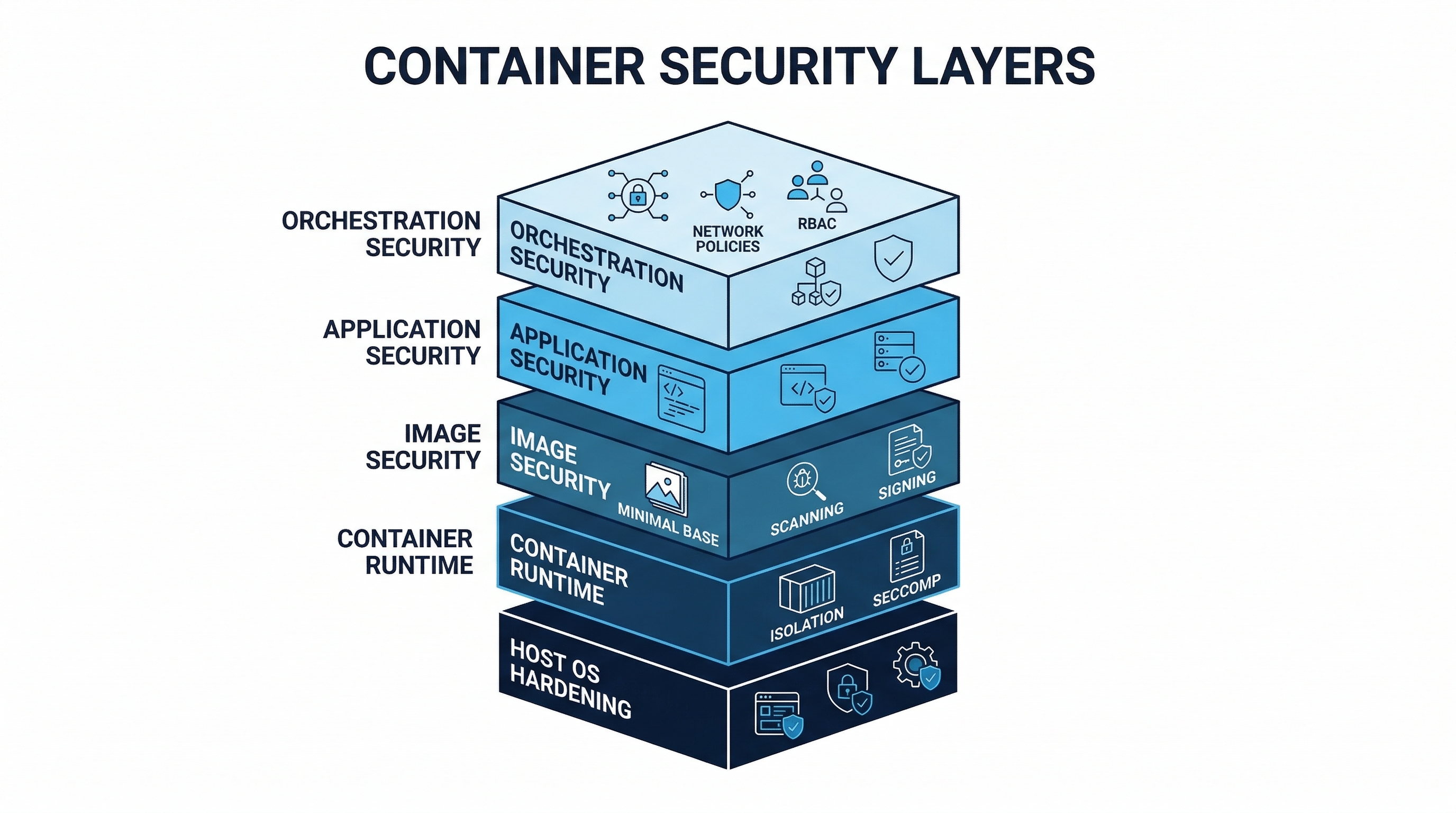 Figure: Container Security Layers — Base image selection, build hardening, runtime protection, and orchestration security
Image Security
Minimal base images:
# BEST: Distroless — no shell, no package manager, minimal attack surface
FROM gcr.io/distroless/java21-debian12@sha256:abc123...

# GOOD: Alpine — small footprint (5 MB base), musl libc
FROM alpine:3.19@sha256:def456...

# BEST for Go/Rust: Scratch — empty image, only your static binary
FROM scratch
COPY --from=builder /app/server /server
ENTRYPOINT ["/server"]

# AVOID: Full OS images (ubuntu, debian) — hundreds of MB of unnecessary packages
No root user:
# Create non-root user
RUN addgroup --system --gid 1001 appgroup && \
    adduser --system --uid 1001 --ingroup appgroup appuser

# Switch to non-root user
USER appuser

# Or use distroless nonroot variant
FROM gcr.io/distroless/static:nonroot
Running as root inside a container means that if an attacker escapes the container, they have root on the host. Running as non-root contains the blast radius.
Multi-stage builds:
# Stage 1: Build — includes compilers, build tools, source code
FROM node:20-alpine AS builder
WORKDIR /app
COPY package*.json ./
RUN npm ci --production=false
COPY . .
RUN npm run build

# Stage 2: Runtime — only production dependencies and built artifacts
FROM node:20-alpine AS runtime
WORKDIR /app
RUN addgroup --system app && adduser --system --ingroup app app
COPY --from=builder --chown=app:app /app/dist ./dist
COPY --from=builder --chown=app:app /app/node_modules ./node_modules
USER app
EXPOSE 3000
CMD ["node", "dist/index.js"]
Multi-stage builds exclude build tools, source code, test fixtures, and development dependencies from the runtime image — reducing both attack surface and image size.
Vulnerability scanning:
# Trivy: scan for OS and application vulnerabilities
trivy image --severity HIGH,CRITICAL --exit-code 1 myapp:latest

# Grype: alternative scanner
grype myapp:latest --fail-on high

# Snyk Container
snyk container test myapp:latest --severity-threshold=high
Sign images and verify before deployment:
# Sign with Cosign (keyless)
cosign sign --yes ghcr.io/myorg/myapp@sha256:abc123...

# Verify at deployment (admission controller or deploy script)
cosign verify --certificate-identity=ci@myorg.com \
  --certificate-oidc-issuer=https://token.actions.githubusercontent.com \
  ghcr.io/myorg/myapp@sha256:abc123...
Digest references, not mutable tags:
# BAD: :latest can point to any image at any time
image: myapp:latest

# BAD: even versioned tags are mutable
image: myapp:v2.1.0

# GOOD: digest is immutable — this exact image, verified
image: myapp@sha256:abc123def456789...
No secrets in images:
# NEVER DO THIS
ENV DATABASE_PASSWORD=mysecret
COPY .env /app/.env
COPY credentials.json /app/

# Instead: inject at runtime via environment variables or mounted secrets
Read-only root filesystem:
# Kubernetes: read-only root filesystem
securityContext:
  readOnlyRootFilesystem: true

# If the app needs to write to specific directories:
volumeMounts:
  - name: tmp
    mountPath: /tmp
  - name: cache
    mountPath: /app/cache
volumes:
  - name: tmp
    emptyDir: {}
  - name: cache
    emptyDir: {}
Regular base image updates:
# Renovate: automated base image updates
{
  "docker": {
    "pinDigests": true
  },
  "packageRules": [
    {
      "matchDatasources": ["docker"],
      "automerge": true,
      "automergeType": "pr",
      "schedule": ["before 6am on Monday"]
    }
  ]
}
Runtime Security
Pod Security Standards / Admission Controllers:
Kubernetes Pod Security Standards define three profiles:
| Profile | Description | Key Restrictions |
|---|---|---|
| Privileged | Unrestricted | None — use only for system-level workloads |
| Baseline | Minimally restrictive | No privileged containers, no hostNetwork, no hostPID, limited volume types |
| Restricted | Heavily restricted | All baseline restrictions plus: non-root, read-only root FS, restricted capabilities, seccomp |
Enforcement through admission controllers:
OPA/Gatekeeper:
apiVersion: constraints.gatekeeper.sh/v1beta1
kind: K8sContainerLimits
metadata:
  name: container-must-have-limits
spec:
  match:
    kinds:
      - apiGroups: [""]
        kinds: ["Pod"]
  parameters:
    cpu: "2"
memory: "2Gi"Kyverno:
apiVersion: kyverno.io/v1
kind: ClusterPolicy
metadata:
  name: require-non-root
spec:
  validationFailureAction: Enforce
  rules:
    - name: check-non-root
      match:
        any:
          - resources:
              kinds:
                - Pod
      validate:
        message: "Containers must not run as root"
        pattern:
          spec:
            containers:
              - securityContext:
                  runAsNonRoot: true
Network Policies:
# Default deny all ingress — then explicitly allow needed traffic
apiVersion: networking.k8s.io/v1
kind: NetworkPolicy
metadata:
  name: default-deny-ingress
  namespace: production
spec:
  podSelector: {}
  policyTypes:
    - Ingress

---
# Allow traffic from frontend to backend only
apiVersion: networking.k8s.io/v1
kind: NetworkPolicy
metadata:
  name: allow-frontend-to-backend
  namespace: production
spec:
  podSelector:
    matchLabels:
      app: backend
  ingress:
    - from:
        - podSelector:
            matchLabels:
              app: frontend
      ports:
        - port: 8080
Runtime Threat Detection:
- Falco: Open-source runtime security. Monitors system calls and detects anomalous behavior (shell spawned in container, unexpected network connection, file write to sensitive path).
- Sysdig Secure: Commercial platform built on Falco with additional features (image scanning, compliance, forensics).
# Falco rule: detect shell in container
- rule: Terminal shell in container
  desc: Detect a shell being spawned in a container
  condition: >
    spawned_process and container and
    proc.name in (bash, sh, zsh, dash, ksh) and
    not proc.pname in (crond, sshd)
  output: >
    Shell spawned in container
    (user=%user.name container=%container.name
     shell=%proc.name parent=%proc.pname)
  priority: WARNING
Resource Limits:
resources:
  requests:
    cpu: "250m"
    memory: "256Mi"
  limits:
    cpu: "1"
    memory: "512Mi"
Resource limits prevent a compromised container from consuming all available resources (denial of service against other workloads) and limit the impact of cryptocurrency miners.
CIS Docker Benchmark
Key controls from the CIS Docker Benchmark:
- Host Configuration: Keep Docker up to date, audit Docker daemon activity, use a separate partition for Docker.
- Docker Daemon Configuration: Restrict network traffic between containers, set logging level to info, configure TLS authentication.
- Docker Daemon Files: Verify ownership and permissions on Docker files and directories.
- Container Images: Create a user for the container, do not install unnecessary packages, use COPY instead of ADD.
- Container Runtime: Do not use privileged containers, do not map privileged ports, do not share the host network namespace.
- Docker Security Operations: Avoid image sprawl, avoid container sprawl.
CIS Kubernetes Benchmark
Key areas:
- Control Plane Components: API server, controller manager, scheduler, etcd security configuration.
- Worker Node Security: kubelet configuration, kube-proxy settings.
- Policies: RBAC, pod security, network policies, secrets management.
- Logging and Monitoring: Audit logging, log rotation, monitoring.
AI and Infrastructure
AI-Generated IaC Risks
AI code generation tools produce IaC templates with the same classes of errors they produce in application code — but infrastructure misconfigurations can have immediate, severe consequences:
Overly permissive security groups:
# AI-generated — DANGEROUS: allows all traffic from anywhere
resource "aws_security_group_rule" "allow_all" {
  type              = "ingress"
  from_port         = 0
  to_port           = 65535
  protocol          = "-1"
  cidr_blocks       = ["0.0.0.0/0"]
  security_group_id = aws_security_group.main.id
}
AI models trained on tutorial code and Stack Overflow answers frequently produce 0.0.0.0/0 rules because tutorials prioritize simplicity over security. In production, every security group rule must restrict access to specific CIDR ranges and specific ports.
Missing encryption:
# AI-generated — DANGEROUS: unencrypted S3 bucket
resource "aws_s3_bucket" "data" {
  bucket = "my-application-data"
  # No server-side encryption configuration
  # No versioning
  # No access logging
  # No public access block
}
AI often generates the minimum viable configuration without security hardening because training data includes millions of examples of minimal configurations.
Public exposure:
# AI-generated — DANGEROUS: publicly accessible database
resource "aws_db_instance" "main" {
  engine         = "postgres"
  instance_class = "db.t3.medium"
  publicly_accessible = true  # AI default — should be false
  # No encryption
  # No backup retention
}
AI-generated Dockerfiles:
# AI-generated — MULTIPLE ISSUES
FROM ubuntu:latest          # :latest is mutable, ubuntu is large
RUN apt-get update && apt-get install -y \
    curl wget vim nano gcc  # unnecessary tools in runtime image
COPY . /app                 # copies everything including .env, .git
WORKDIR /app
RUN npm install             # installs dev dependencies too
EXPOSE 3000
CMD ["npm", "start"]        # running as root (no USER directive)
Scanning AI-Generated Infrastructure Code
All AI-generated IaC must pass through the same security scanning as human-written IaC:
- Pre-commit: Checkov, tfsec, or KICS as pre-commit hooks catch issues before they enter version control.
- CI pipeline: Automated scanning in every PR with build failure on violations.
- Plan review:
terraform planoutput reviewed by a human who understands security implications before any apply. - Guardrails for AI generation: When using AI to generate IaC, provide explicit security requirements in the prompt: “Generate a Terraform configuration for an S3 bucket with server-side encryption using AWS KMS, versioning enabled, public access blocked, and access logging to a separate bucket.”
AI-Assisted Drift Detection
AI can improve infrastructure security monitoring:
- Anomaly detection in configuration changes: ML models learn normal configuration patterns and alert on deviations — a security group that suddenly allows a new CIDR range, an IAM policy that gains a new action, a resource that loses encryption.
- Intelligent remediation suggestions: When drift is detected, AI suggests the most appropriate remediation — update the IaC to match (if the change was intentional) or revert the manual change (if it was unauthorized).
- Predictive compliance: AI models predict which configuration changes are likely to cause compliance violations before they are applied, based on historical patterns of violations and remediations.
Implementation Checklist
| Control | Priority | Status |
|---|---|---|
| All infrastructure defined in version-controlled IaC | Critical | |
| IaC security scanning in CI (Checkov/tfsec/KICS) | Critical | |
| CIS Benchmarks applied to all platforms | Critical | |
| No manual infrastructure changes (drift detection) | High | |
| Container images use minimal base (distroless/Alpine) | High | |
| All containers run as non-root | High | |
| Container images scanned for vulnerabilities | High | |
| Container images signed and verified at deployment | High | |
| Digest references used (not mutable tags) | High | |
| Network policies restrict container communication | High | |
| Pod security standards enforced | High | |
| Runtime threat detection deployed (Falco) | Medium | |
| State files encrypted and access-controlled | High | |
| Automated compliance scanning | Medium | |
| AI-generated IaC reviewed with extra scrutiny | High | |
| Read-only root filesystem for containers | Medium | |
| Resource limits on all containers | Medium |
Key Takeaways
- Infrastructure is code — treat it like code: Version control, peer review, automated testing, and security scanning apply to infrastructure definitions just as they do to application code.
- No manual changes: Every manual change is an unreviewed, unaudited, unreproducible security risk. Drift detection catches what process misses.
- Minimal, non-root, scanned, signed: Container security in four words. Minimal base images, non-root execution, vulnerability scanning, and signature verification are non-negotiable.
- CIS Benchmarks are the baseline: Do not invent hardening standards. Start with CIS Benchmarks and customize only where documented business requirements demand it.
- AI-generated IaC defaults to insecure: AI models trained on tutorial code produce tutorial-quality security. Scan everything, review everything, and provide explicit security requirements when prompting AI for infrastructure code.
- Defense in depth for containers: Image security (build time) plus admission controllers (deploy time) plus runtime detection (run time) plus network policies (network time) create layers that no single bypass defeats.
References
- CIS Controls v8, Control 16.7
- CIS Benchmarks: https://www.cisecurity.org/cis-benchmarks
- DISA STIGs: https://public.cyber.mil/stigs/
- Checkov: https://www.checkov.io/
- Trivy: https://trivy.dev/
- Falco: https://falco.org/
- Kyverno: https://kyverno.io/
- OPA/Gatekeeper: https://open-policy-agent.github.io/gatekeeper/
- Sigstore/Cosign: https://sigstore.dev/
- CIS Docker Benchmark: https://www.cisecurity.org/benchmark/docker
- CIS Kubernetes Benchmark: https://www.cisecurity.org/benchmark/kubernetes
Study Guide
Key Takeaways
- Infrastructure is code — treat it like code — Version control, peer review, automated testing, and security scanning for all IaC.
- No manual changes — Every manual change is unreviewed, unaudited, and unreproducible; drift detection catches what process misses.
- Minimal, non-root, scanned, signed — Container security in four words: minimal base images, non-root execution, vulnerability scanning, signature verification.
- CIS Benchmarks are the baseline — Do not invent hardening standards; start with CIS and customize only with documented business justification.
- AI-generated IaC defaults to insecure — Training on tutorial code produces 0.0.0.0/0 security groups, public databases, and missing encryption.
- Defense in depth for containers — Image security (build) + admission controllers (deploy) + runtime detection (run) + network policies (network).
- Terraform state files are sensitive — Contain full infrastructure state including secrets; encrypt at rest, access-control, use state locking.
Important Definitions
| Term | Definition |
|---|---|
| Infrastructure Drift | Actual state diverges from IaC code due to manual changes (console clicking) |
| CIS Benchmarks | Industry-standard hardening configurations published for virtually every major platform |
| DISA STIGs | US DoD hardening standards; more prescriptive than CIS Benchmarks |
| Distroless | Container images with no shell, no package manager; minimal attack surface |
| Scratch Image | Completely empty container base; only the compiled binary, nothing else |
| Pod Security Standards | Kubernetes profiles: Privileged (unrestricted), Baseline (minimal), Restricted (heavily constrained) |
| Falco | Open-source runtime security monitoring system calls and detecting anomalous container behavior |
| Checkov | IaC scanner with 1,000+ policies covering CIS, SOC 2, PCI-DSS, HIPAA, NIST 800-53 |
| Multi-Stage Build | Dockerfile technique separating build tools from runtime image to reduce attack surface |
| Admission Controller | Kubernetes component (OPA/Gatekeeper, Kyverno) enforcing policies at deployment time |
Quick Reference
- Base Image Priority: Scratch (Go/Rust) > Distroless > Alpine > Full OS (avoid)
- K8s Security Standards: Privileged (system only), Baseline (no privileged, no hostNetwork), Restricted (non-root, read-only FS, seccomp)
- IaC Scanners: Checkov (1000+ policies), tfsec (Terraform-specific), KICS (multi-platform, 2000+ queries)
- Container Checklist: Non-root USER, digest references, multi-stage build, read-only root FS, resource limits, no secrets in image
- Common Pitfalls: Running containers as root, using :latest tags, baking secrets into images, AI-generated IaC with 0.0.0.0/0 rules, manual infrastructure changes, local Terraform state
Review Questions
- Why should containers run as non-root, and what specific risk does running as root inside a container create?
- Explain infrastructure drift, why it is a security risk, and how to detect and remediate it.
- An AI generates a Terraform config with a publicly accessible database and no encryption — what specific scanning and review steps should catch this?
- Compare the three Kubernetes Pod Security Standard profiles and describe when each is appropriate.
- Design a container image security pipeline from base image selection through runtime monitoring, specifying tools at each stage.