6.4 — Secrets Management
Listen instead
Introduction
Credentials are the keys to the kingdom. Database passwords, API keys, cloud access tokens, SSH private keys, signing certificates, encryption keys — these are the most valuable assets an attacker can obtain. A single leaked credential can provide access to production databases, customer data, cloud infrastructure, and internal systems. Hardcoded secrets are consistently among the top preventable breach vectors, and the problem is getting worse as AI coding assistants inadvertently introduce and propagate secrets at scale.
CIS Control 16.1 requires establishing and maintaining a secure application development process. Secrets management is a foundational element of that process. An organization that cannot manage secrets securely cannot build secure software, no matter how sophisticated its other controls.
This module covers the rules of secrets management, defense-in-depth detection, incident response for exposed secrets, the specific risks AI tools introduce, and the configuration controls available to prevent AI-related leakage.
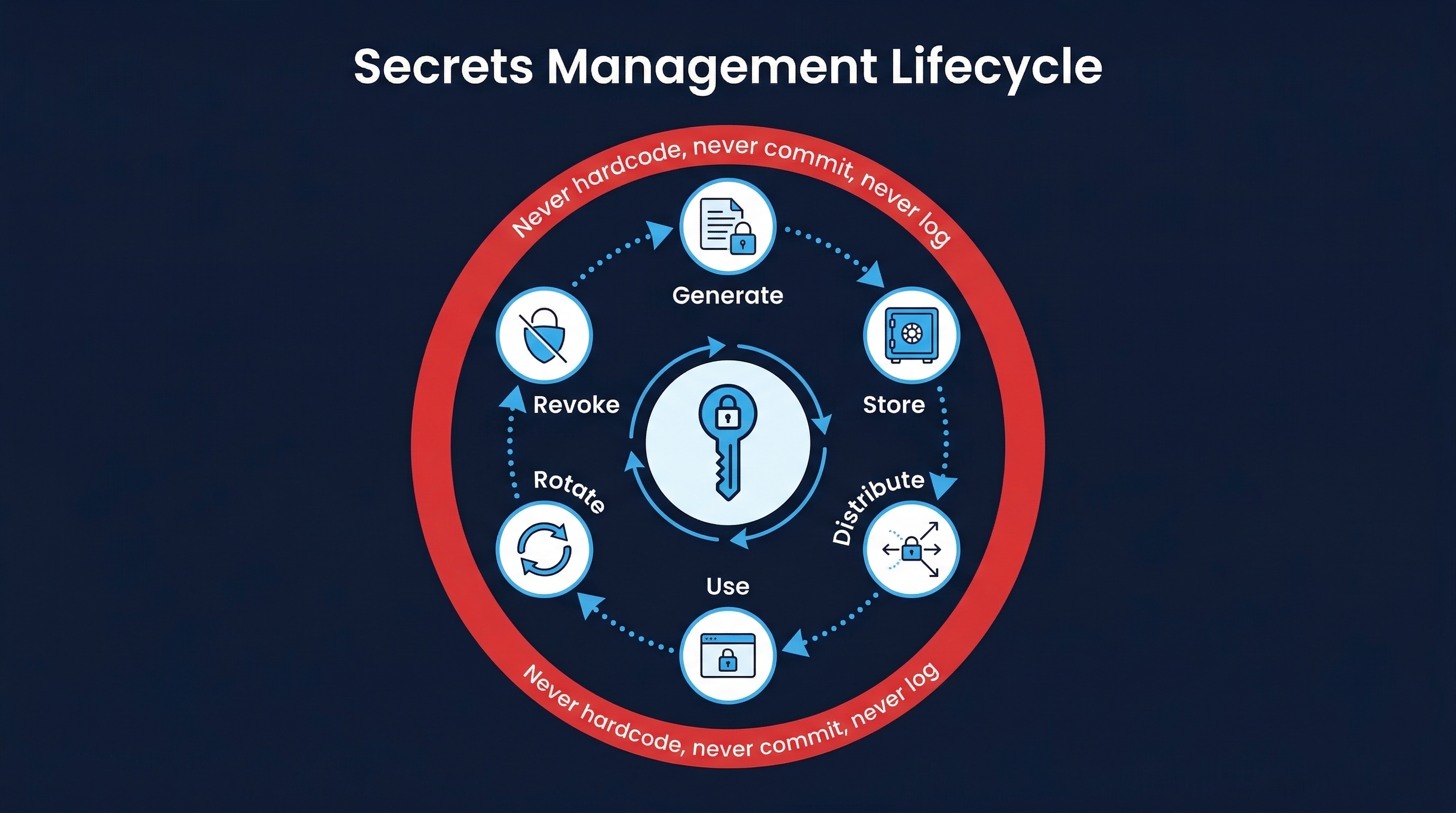 Figure: Secrets Management Lifecycle — Creation, storage, rotation, detection, and incident response for secrets
Why Secrets Management Matters
The Scope of the Problem
- GitHub scans over 200 million commits per day for secrets and finds millions of exposed credentials annually. In 2023, GitHub detected over 12 million secrets across public repositories.
- GitGuardian’s 2025 report: 12.8 million new secrets detected in public GitHub commits, a 28% increase year-over-year.
- Average time to detect a leaked secret: 327 days (IBM Cost of a Data Breach Report).
- Average cost of a breach involving compromised credentials: $4.81 million.
- Once a secret is committed to Git: It exists in the repository history forever unless explicitly removed. Even if the file is deleted in the next commit, the secret remains in the Git history and can be found by anyone with access to the repository.
Consequences of Exposed Secrets
- Uber (2022): An attacker purchased corporate credentials on the dark web, used MFA fatigue (repeated push notifications) to bypass MFA, and gained access to internal systems including Slack, HackerOne vulnerability reports, and cloud infrastructure.
- CircleCI (2023): A compromised engineer laptop led to stolen session tokens, which allowed access to customer environment variables — many containing secrets.
- Microsoft (2023): A consumer signing key was inadvertently included in a crash dump, exfiltrated by attackers, and used to forge authentication tokens for multiple cloud services.
Secrets Management Rules
Never Hardcode Secrets
This is the cardinal rule. No exceptions.
# NEVER DO THIS — secret in source code
DATABASE_URL = "postgresql://admin:P@ssw0rd123@prod-db.example.com:5432/app"
API_KEY = "sk-live-abc123def456ghi789"

# NEVER DO THIS — secret in configuration file committed to VCS
# config/database.yml
production:
  password: "P@ssw0rd123"

# NEVER DO THIS — secret in CI/CD pipeline definition
env:
  AWS_SECRET_ACCESS_KEY: "wJalrXUtnFEMI/K7MDENG/bPxRfiCYEXAMPLEKEY"
None of these are acceptable. Not in source code, not in configuration files, not in CI/CD pipeline definitions, not in Dockerfiles, not in shell scripts, not in environment variable files committed to version control.
Centralized Secrets Management
All secrets must be managed through a dedicated secrets management system:
HashiCorp Vault:
- Industry standard for secrets management.
- Dynamic secrets: generates short-lived, unique credentials for each client. Database credentials created on-demand and automatically revoked after TTL expiry.
- Transit encryption: encrypt/decrypt data without exposing encryption keys to the application.
- PKI management: automated certificate issuance and renewal.
- Comprehensive audit logging of all secret access.
AWS Secrets Manager:
- Native AWS integration with IAM-based access control.
- Automatic rotation for RDS, Redshift, DocumentDB credentials.
- Cross-account sharing through resource policies.
- CloudTrail integration for audit logging.
Azure Key Vault:
- FIPS 140-2 Level 2 (standard) or Level 3 (premium) HSM-backed.
- Certificate lifecycle management.
- Managed identities for passwordless access from Azure services.
CyberArk:
- Enterprise privileged access management (PAM).
- Session recording for privileged access.
- Credential rotation and vaulting for both human and machine identities.
Short-Lived Credentials via OIDC Token Exchange
The best secret is one that does not exist. OIDC (OpenID Connect) token exchange eliminates long-lived credentials:
- How it works: The CI/CD platform issues an OIDC token that proves the build’s identity (repository, branch, workflow, actor). The cloud provider or secrets manager validates this token and issues a short-lived credential scoped to the specific permissions needed.
- No secret to store, rotate, or leak: The OIDC token is generated fresh for each build and expires in minutes.
- Minimal scope: The issued credential is scoped to exactly the permissions needed for the specific build step, not a broad-access key.
# GitHub Actions: OIDC federation with AWS
permissions:
  id-token: write
  contents: read

steps:
  - uses: aws-actions/configure-aws-credentials@v4
    with:
      role-to-assume: arn:aws:iam::123456789012:role/deploy-staging
      aws-region: us-east-1
      # No AWS_ACCESS_KEY_ID or AWS_SECRET_ACCESS_KEY anywhere
Runtime Injection
Secrets are injected at runtime, never baked into artifacts:
- Environment variables: Injected by the orchestrator (Kubernetes, ECS, Docker Compose) at container start time, sourced from the secrets manager.
- Mounted files: Secret files mounted into the container filesystem by the orchestrator (Kubernetes Secrets, Docker Secrets), not included in the image.
- API retrieval: Application fetches secrets from the vault at startup using its identity (Kubernetes service account, cloud instance role).
Rotation Policy
Secrets must be rotated:
- On schedule: 90 days maximum for most secrets. 30 days for high-privilege credentials.
- Immediately on suspected compromise: Any indication of exposure triggers immediate rotation.
- Automatically where possible: Vault dynamic secrets auto-expire. AWS Secrets Manager auto-rotates RDS credentials. Automation eliminates the human failure mode.
- Post-incident: After any security incident, rotate all secrets that could have been exposed, even if you are not certain they were.
Audit Trail
Every secret access must be logged:
- Who accessed what: Identity of the accessor, which secret, when.
- How it was accessed: Through API, through UI, through CLI.
- From where: Source IP, service identity, build ID.
- Anomaly detection: Alert on unusual access patterns — access from new IPs, access at unusual times, access to secrets not previously accessed by this identity.
Defense in Depth for Secrets Detection
No single layer catches everything. Detection must be layered across the entire development lifecycle:
Layer 1: IDE — Real-Time Detection
Detection at the point of creation, before the secret even reaches the staging area:
- GitLens: Git integration for VS Code with security features.
- GitGuardian IDE Plugin: Real-time scanning as developers type. Alerts immediately when a secret-like pattern is detected in the current file.
- IntelliJ Built-in Secret Detection: JetBrains IDEs flag hardcoded secrets in real-time.
Layer 2: Pre-Commit — Block Before It Enters VCS
The last automated gate before a secret enters the repository:
GitLeaks:
# .pre-commit-config.yaml
repos:
  - repo: https://github.com/gitleaks/gitleaks
    rev: v8.18.0
    hooks:
      - id: gitleaks
git-secrets (AWS):
# Install and configure
git secrets --install
git secrets --register-aws
# Blocks commits containing AWS keys, secret keys, account IDsTruffleHog:
# Pre-commit with TruffleHog
trufflehog git file://. --only-verified --fail
detect-secrets (Yelp):
# Generate baseline, then scan against it
detect-secrets scan > .secrets.baseline
detect-secrets audit .secrets.baseline
Layer 3: CI Pipeline — Post-Commit Scanning
Even if pre-commit hooks are bypassed (new developer without hooks configured, force push, hook disabled), CI catches it:
- GitGuardian CI: Scans every commit in every PR for secrets. Blocks merge if secrets are detected.
- GitHub Secret Scanning: Automatically scans all pushes to public and private repositories (GitHub Advanced Security). Partners with secret providers (AWS, Azure, GCP, Stripe, etc.) to automatically revoke detected credentials.
- detect-secrets in CI: Run as a CI step to validate that the secrets baseline has not grown.
# GitHub Actions: secret scanning step
- name: Secret Scan
  uses: trufflesecurity/trufflehog@main
  with:
    path: ./
    base: ${{ github.event.pull_request.base.sha }}
    head: ${{ github.event.pull_request.head.sha }}
    extra_args: --only-verified
Layer 4: Repository History — Periodic Full Scans
Secrets may have been committed before scanning was implemented:
- TruffleHog history mode: Scans the entire Git history for secrets, not just the current HEAD.
- GitLeaks history mode:
gitleaks detect --source=. --log-opts="--all"scans all branches and all commits. - Schedule: Run full history scans monthly. Run them after any incident involving credential theft.
- Scope: Scan all repositories, not just active ones. Archived and legacy repositories often contain forgotten secrets.
Layer 5: Runtime — Monitor Secret Usage
After secrets are deployed:
- Vault audit logs: Every secret read, write, list, and delete operation is logged.
- CloudTrail: All API calls using cloud credentials are logged.
- Anomaly detection: Alert on credential use from unexpected sources, at unexpected times, or for unexpected operations.
- Canary tokens: Deploy fake credentials (honeytokens) in locations where real credentials are sometimes found (config files, environment variables). Any use of these credentials triggers an immediate alert.
Response to Detected Secrets
When a secret is detected in version control, the response must be immediate and thorough:
Step 1: Immediately Rotate the Exposed Credential
Do not investigate first. Rotate first, then investigate. The secret must be assumed compromised from the moment it was exposed:
- API keys: Generate new key, update all consumers, revoke old key.
- Passwords: Change immediately in the source system and all locations using it.
- Tokens: Revoke and reissue.
- Certificates/private keys: Revoke certificate, generate new key pair, issue new certificate.
Step 2: Determine Exposure Scope
After rotation, assess the blast radius:
- Was it pushed to a remote? Secrets in local-only commits are lower risk (but still compromised if the workstation is not fully trusted).
- Was the repository public? Public repositories are indexed by bots within seconds. Assume the secret was harvested by automated scanners the moment it was pushed.
- How long was it exposed? Check the commit timestamp vs. detection timestamp. The longer the exposure, the higher the probability of exploitation.
- Who had access? All users with read access to the repository could have seen the secret.
Step 3: Audit Access Logs
Check the logs for the compromised credential:
- Cloud provider logs: Were there API calls from unexpected IPs, regions, or user agents?
- Application logs: Were there authenticated requests from unexpected sources?
- Network logs: Were there connections to unexpected destinations using this credential?
Step 4: Remove from Git History
Deleting the file in a new commit does not remove the secret from history. It must be actively purged:
BFG Repo-Cleaner (faster, simpler):
# Remove all files matching a pattern from history
bfg --delete-files '*.env' repo.git
bfg --replace-text passwords.txt repo.git

# Then clean and push
cd repo.git
git reflog expire --expire=now --all
git gc --prune=now --aggressive
git push --force
git filter-repo (more flexible):
# Remove a specific file from all history
git filter-repo --path config/secrets.yml --invert-paths

# Replace specific strings in all history
git filter-repo --blob-callback '
  return blob.data.replace(b"sk-live-abc123", b"REDACTED")
'Important: After history rewriting, all collaborators must re-clone the repository. Force-pushed history rewrites break existing clones.
Step 5: Post-Incident Review
After the immediate response:
- Root cause: Why was the secret hardcoded? Was it a developer shortcut? A missing tool? An unclear process?
- Process improvement: What changes will prevent recurrence? New pre-commit hooks? Better onboarding? Automated detection?
- Training: Does the team need refresher training on secrets management?
- Tool gaps: Are there layers of detection missing?
AI Tools and Secret Leakage
AI coding assistants introduce new vectors for secret exposure. The data is clear and concerning.
The 6.4% Problem
Research has demonstrated a 6.4% secret leakage rate in repositories using GitHub Copilot — 40% higher than the baseline rate for repositories without AI assistance. This happens because:
- AI suggests patterns it has learned: If training data included code with hardcoded credentials (and it did — millions of examples), the AI will reproduce those patterns.
- Context-based leakage: AI assistants read local files for context. If
.envfiles, configuration files, or other credential-containing files are in the project, the AI may incorporate those values into its suggestions. - Autocomplete propagation: A developer types
API_KEY =and the AI completes it with a value. The value may be from training data, from the local context, or fabricated — but it looks like a real key, and if the developer accepts it, it is committed.
Induction Attacks
Attackers can actively manipulate AI coding assistants:
- Copilot instruction injection via GitHub Issues: Researchers demonstrated that crafting specific text in GitHub Issues could influence Copilot’s suggestions for developers working in the same repository. The injected text could direct Copilot to include specific code patterns, including credential exfiltration.
- Repository-level manipulation: Attackers create or modify files in a repository (through compromised accounts, accepted PRs, or if they have write access) to include hidden instructions that influence AI assistant behavior.
AI Tools Indexing Sensitive Files
AI coding assistants are designed to understand project context. They read files to provide better suggestions. This means:
.envfiles: Often contain database URLs, API keys, and service credentials. If the AI indexes these, it may include their values in suggestions.- Config files:
application.properties,appsettings.json,config.yaml— may contain sensitive configuration. - Private keys:
.pem,.keyfiles — if not excluded, the AI has access to private key material.
Configuring AI Tool Deny Rules
Every AI coding assistant provides mechanisms to exclude sensitive files from its context. These must be configured before the tool is used in any project.
Standard Deny Patterns
These patterns should be denied across all AI tools:
# Environment and secret files
.env*
*.env
.env.local
.env.production
.env.*.local

# Cryptographic material
*.key
*.pem
*.p12
*.pfx
*.jks
*.keystore
id_rsa*
id_ed25519*
id_ecdsa*

# Configuration with potential secrets
config/secrets/
config/credentials/
credentials.json
auth-config.*
database-passwords.*
service-account*.json

# Cloud provider credentials
.aws/credentials
.azure/credentials
.gcp/credentials.json
kubeconfig

# Package manager tokens
.npmrc
.pypirc
.gem/credentials

# Certificate stores
*.cer
*.crt
ca-bundle.*
Claude Code: Three-Tier Permission System
Claude Code provides the most granular control through deny rules in .claude/settings.json:
{
  "deny": [
    "Read(.env*)",
    "Read(*.key)",
    "Read(*.pem)",
    "Read(config/secrets/**)",
    "Read(credentials.*)",
    "Read(.aws/**)",
    "Read(*.p12)",
    "Read(*.pfx)",
    "Read(id_rsa*)",
    "Read(id_ed25519*)",
    "Bash(cat .env*)",
    "Bash(*SECRET*)",
    "Bash(*PASSWORD*)",
    "Bash(*API_KEY*)"
  ]
}
Claude Code deny rules operate at the highest precedence — they cannot be overridden by ask or allow rules. They provide file-level, command-level, and network-level control:
- File-level: Block reading specific files or patterns.
- Command-level: Block execution of commands that might expose secrets.
- Network-level: Block connections to unauthorized endpoints.
GitHub Copilot: Organization Content Exclusions
GitHub Copilot (Business/Enterprise) supports content exclusions configured centrally:
- Centralized management: Configured through the GitHub web interface at the organization level.
- Repository-level exclusions: Exclude specific repositories entirely.
- Path-level exclusions: Exclude specific file paths across all repositories.
- Scales across the organization: A single configuration applies to all organization members.
# GitHub Copilot Content Exclusion (org settings)
- "**/.env*"
- "**/config/secrets/**"
- "**/*.key"
- "**/*.pem"
- "**/credentials.*"Limitation: Copilot content exclusions lack the granular command-level controls available in Claude Code. They are file/path-based only.
Cursor: Privacy Mode and .cursorignore
Cursor provides:
- Privacy Mode: When enabled, no code is stored or used for training. Must be explicitly enabled.
- Workspace Trust: Verifies that the workspace is trusted before allowing full AI features.
- .cursorignore: File-level exclusions using gitignore syntax.
# .cursorignore
.env*
*.key
*.pem
config/secrets/
credentials.*Limitation: Less comprehensive than Claude Code’s three-tier system. No command-level controls.
Codex CLI
Codex CLI provides OS-level sandboxing:
- macOS Seatbelt / Linux Landlock+seccomp: The AI operates within an OS-level sandbox that restricts file access and system calls.
- Network access disabled by default: The AI cannot make network requests unless explicitly enabled.
- Strongest isolation available: But also the most restrictive — some development workflows may be constrained.
Roo Code: .rooignore
Roo Code uses .rooignore files with gitignore syntax:
# .rooignore
.env*
*.key
*.pem
config/secrets/
Known risk: Symlinks can bypass .rooignore exclusions. A symlink from an allowed directory to a denied file may allow access. Test your exclusion rules with symlinks.
Multi-Layer Protection
No single mechanism is sufficient. Layer protections:
.gitignore: Prevents secret files from being committed. First line of defense.- AI tool exclusions: Prevents AI from reading secret files. Second line.
- Environment variable discipline: Secrets in the runtime environment, not in files at all. Third line.
- Pre-commit hooks: Catches any secrets that slip through. Fourth line.
- CI scanning: Catches anything that reaches the repository. Fifth line.
Vault Integration Patterns
Dynamic Secrets
Dynamic secrets are generated on-demand for each consumer and automatically revoked after use:
# HashiCorp Vault: generate a dynamic database credential
vault read database/creds/app-role
# Returns: username=v-app-role-xyz, password=A1B2C3..., ttl=1h
# After 1 hour, the credential is automatically revoked- Eliminates shared credentials: Each application instance gets unique credentials.
- Automatic cleanup: No stale credentials to manage.
- Audit trail: Every credential generation is logged with the requesting identity.
Transit Encryption
Vault’s transit engine provides encryption-as-a-service:
# Encrypt data without the application ever seeing the key
vault write transit/encrypt/my-key plaintext=$(base64 <<< "sensitive data")
# Returns: ciphertext=vault:v1:abc123...

# Decrypt
vault write transit/decrypt/my-key ciphertext="vault:v1:abc123..."
# Returns: plaintext (base64 encoded)- Keys never leave Vault: The application sends data to Vault for encryption/decryption. The key material is never exposed.
- Key rotation: Keys can be rotated without re-encrypting existing data (Vault manages multiple key versions).
PKI (Public Key Infrastructure)
Vault can act as a certificate authority:
# Issue a certificate
vault write pki/issue/web-servers \
  common_name="app.example.com" \
  ttl="720h"
# Returns: certificate, private key, CA chain
# Certificate auto-expires — no manual renewal needed
Kubernetes Secrets Management
Kubernetes native secrets are base64-encoded (not encrypted) by default. Production deployments require additional protections:
Sealed Secrets (Bitnami)
- Encrypt secrets client-side using a public key. Only the Sealed Secrets controller in the cluster (with the private key) can decrypt them.
- Encrypted secrets can be safely committed to Git.
External Secrets Operator
- Syncs secrets from external providers (Vault, AWS Secrets Manager, Azure Key Vault, GCP Secret Manager) into Kubernetes Secrets.
- Single source of truth: secrets managed in the external provider, automatically synced to Kubernetes.
CSI Secret Store Driver
- Mounts secrets from external providers as volumes in pods.
- Secrets are fetched at pod start and optionally rotated.
- No Kubernetes Secret object created — secrets go directly from the provider to the pod filesystem.
# External Secrets Operator: sync from AWS Secrets Manager
apiVersion: external-secrets.io/v1beta1
kind: ExternalSecret
metadata:
  name: app-secrets
spec:
  refreshInterval: 1h
  secretStoreRef:
    name: aws-secrets-manager
    kind: ClusterSecretStore
  target:
    name: app-secrets
  data:
    - secretKey: database-password
      remoteRef:
        key: prod/app/database
        property: password
CI/CD Specific Secrets Practices
Secret Masking in Logs
All CI platforms support secret masking — when a value is registered as a secret, it is redacted in all log output:
- GitHub Actions: Secrets registered in repository/organization settings are automatically masked. Additional values can be masked with
::add-mask::. - GitLab CI: Protected and masked variables are redacted in job logs.
- Jenkins: Credentials plugin masks values in console output.
Caution: Masking is not foolproof. Secrets can leak through:
- Encoding (base64, URL encoding, hex).
- Substring matching (if masking matches exact value but not partial).
- Error messages that include variable values.
- Debug output that bypasses masking.
OIDC for Cloud Provider Auth
Eliminate long-lived cloud credentials entirely:
| CI Platform | Cloud Provider | Method |
|---|---|---|
| GitHub Actions | AWS | aws-actions/configure-aws-credentials with role-to-assume |
| GitHub Actions | Azure | azure/login with federated credentials |
| GitHub Actions | GCP | google-github-actions/auth with Workload Identity Federation |
| GitLab CI | AWS | CI/CD Variables with OIDC and assume_role_with_web_identity |
| GitLab CI | GCP | ID tokens with Workload Identity Federation |
No Long-Lived Tokens
- Personal access tokens in CI: Never. Use OIDC, GitHub App installation tokens, or short-lived deploy keys.
- Service account keys: Only when OIDC is not available. Rotate every 30 days. Monitor usage.
- SSH keys: Deploy keys with read-only access. Rotate regularly. Consider SSH certificate authorities for short-lived SSH credentials.
Implementation Checklist
| Control | Priority | Status |
|---|---|---|
| Centralized secrets manager deployed (Vault/cloud KMS) | Critical | |
| No hardcoded secrets in any repository | Critical | |
| OIDC federation for CI/CD cloud access | Critical | |
| Pre-commit hooks for secret detection | Critical | |
| CI pipeline secret scanning | Critical | |
| AI tool deny rules configured for all tools | Critical | |
| Secret masking enabled in all CI platforms | High | |
| Full Git history scan completed | High | |
| Secret rotation policy defined and automated | High | |
| Dynamic secrets for database credentials | High | |
| Kubernetes secrets encrypted at rest (or external secrets) | High | |
| Canary tokens/honeytokens deployed | Medium | |
| Monthly full-history secret scans | Medium | |
| Vault audit log monitoring with anomaly detection | Medium | |
| Developer training on secrets management | Medium |
Key Takeaways
- Rotation first, investigation second: When a secret is exposed, rotate immediately. Every minute of investigation before rotation is a minute the attacker may be using the credential.
- The best secret is one that does not exist: OIDC token exchange, dynamic secrets, and short-lived credentials eliminate entire categories of risk.
- Defense in depth is mandatory: IDE, pre-commit, CI, history scanning, runtime monitoring — no single layer catches everything.
- AI tools increase secret leakage by 40%: The 6.4% leakage rate in Copilot repos is not a theoretical risk — it is measured reality. Configure AI tool deny rules before allowing AI tools in any project.
- Git history is forever: A secret committed and then deleted in the next commit is still in the repository history. Purging history is expensive and disruptive. Prevention is far cheaper than remediation.
- Layer your protections:
.gitignore+ AI tool deny rules + pre-commit hooks + CI scanning + runtime monitoring. Each layer catches what the previous layers miss.
References
- CIS Controls v8, Control 16.1
- NIST SP 800-218 (SSDF): Practice PO.5 (Protect Software)
- GitGuardian State of Secrets Sprawl 2025
- HashiCorp Vault Documentation: https://developer.hashicorp.com/vault
- GitHub Secret Scanning: https://docs.github.com/en/code-security/secret-scanning
- GitLeaks: https://github.com/gitleaks/gitleaks
- TruffleHog: https://github.com/trufflesecurity/trufflehog
- Claude Code Documentation: https://docs.anthropic.com/en/docs/claude-code
Study Guide
Key Takeaways
- Rotate first, investigate second — When a secret is exposed, rotate immediately; every minute before rotation is a minute attackers may be using it.
- The best secret is one that does not exist — OIDC token exchange, dynamic secrets, and short-lived credentials eliminate entire risk categories.
- Defense in depth is mandatory — IDE, pre-commit, CI, history scanning, runtime monitoring; no single layer catches everything.
- AI tools increase secret leakage by 40% — 6.4% leakage rate in Copilot repos is measured reality, not theoretical risk.
- Git history is forever — A secret committed then deleted in the next commit remains in history; purging is expensive and disruptive.
- Average detection time is 327 days — IBM data; automated scanning within seconds of push is critical.
- Configure AI tool deny rules before allowing AI tools — Claude Code deny/ask/allow, Copilot content exclusions, Cursor privacy mode, Codex CLI sandbox.
Important Definitions
| Term | Definition |
|---|---|
| Dynamic Secrets | Credentials generated on-demand per consumer, automatically revoked after TTL expiry |
| OIDC Token Exchange | CI platform issues short-lived identity token; cloud provider returns scoped credential |
| Canary Token (Honeytoken) | Fake credential planted where real ones are sometimes found; any use triggers alert |
| Transit Encryption | Vault service encrypting/decrypting data without exposing keys to the application |
| Secret Masking | CI platform redacting known secret values from log output |
| BFG Repo-Cleaner | Tool for removing secrets from Git history faster than git filter-repo |
| GitLeaks | Pre-commit hook tool detecting API keys, passwords, and tokens before VCS entry |
| Claude Code Deny Rules | Highest-precedence rules that cannot be overridden; block file, command, and network access |
| Symlink Bypass | Known Roo Code risk where symlinks can circumvent .rooignore exclusions |
| Cryptographic Erasure | Destroying all encryption key copies to render encrypted data unrecoverable |
Quick Reference
- Rotation Policy: 90 days max standard, 30 days high-privilege, immediate on compromise
- Detection Layers: IDE (real-time) -> Pre-commit (GitLeaks) -> CI (GitGuardian) -> History (TruffleHog) -> Runtime (Vault audit + canary tokens)
- AI Tool Controls: Claude Code (deny/ask/allow 3-tier), Copilot (org content exclusions), Cursor (.cursorignore + privacy mode), Codex CLI (OS-level sandbox), Roo Code (.rooignore, watch for symlink bypass)
- Response Steps: Rotate -> Scope exposure -> Audit logs -> Purge history -> Post-incident review
- Common Pitfalls: Investigating before rotating, deleting file instead of purging history, relying on masking alone, not configuring AI deny rules, shared service accounts across systems
Review Questions
- Why is deleting a file containing a secret in the next commit insufficient, and what is the correct remediation procedure?
- Compare the secret exclusion mechanisms of Claude Code, Copilot, Cursor, and Codex CLI — which provides the strongest controls and why?
- Design a defense-in-depth secret detection strategy covering all five layers, specifying tools at each layer.
- How do dynamic secrets in HashiCorp Vault eliminate the need for shared database credentials?
- A developer on a personal AI plan submits proprietary code to a training-eligible service — what is the immediate response and what prevention controls should exist?